ZBrushCentral

Answered: Right Shelf Buttons on bottom not all visible

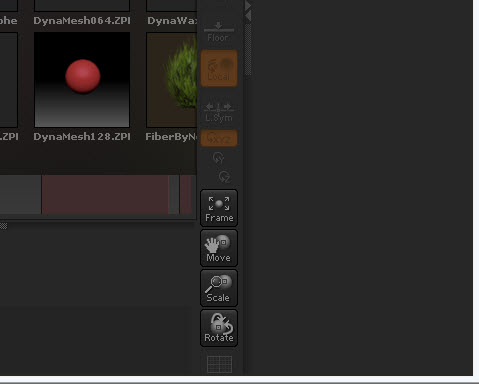
Referring to the Zbrush Starting Guide, there are a few buttons shown on page 3 as well as the tutorial uses a button (Transp --page 22) that is not visible on my computer and hence not accessible. The buttons that are missing are labelled:
Poly F (sometimes visible), Transp, Ghost, Solo, Xpose.

My computer screen resolution is 1366 x 768. I have attached a screen shot for the bottom of my screen, FYI - I have moved my Windows toolbar over to the right side to free us some pixels.

How can I make them accessible? Or do they have hot keys?

Attachments
Right Shelf bottom of screen.jpg

Smaller UI config http://www.zbrushcentral.com/showthread.php?94752-Useful-small-ZScripts-and-Macros-for-ZBrush-4.0&p=734962&viewfull=1#post734962

Bear in mind that your display does not meet ZBrush 4’s minimum system requirements and so is not officially supported. See http://www.pixologic.com/zbrush/system/

Thanks for the help. The smaller UI had some issues (not all showing). Will stay with origional UI now that I know where I can find them in the transform menu. The less than minimum display may explain future unknown unknown issues
Regards