ZBrushCentral

Answered: Problems with ZSketch in ZBrush 4

[Re: ZBrush 4 running in Windows 7 Pro 64-bit, on Dell XPS 16 (Core i7 820 with 4 GB), ZB compact mem set to 1024.]

I’ve been having problems with ZSketch in ZBrush 4. Sometimes I get a Windows message that ZB has stopped working. No other error message.

Sometimes, I get weird behavior. For example, hitting Shift+A toggles between EditSketch and ShowSketch rather than between the armature and the sketch.

Another example: I created a simple armature from 3 zspheres. I sketched two strips of spheres onto the armature and bound the spheres to the armature. I then saved the tool.

Next, I closed the document without saving changes. The armature disappeared; however the transparent image of the two strips I had sketched onto the armature remained on the screen. Using ^N in Draw mode would not clear the screen. I could still operate the options in the ZSketch palette (EditSketch, ShowSketch, Bind); however, no combination would permit ^N to clear the transparent image from the screen.

I noted that once I moved from Edit/Draw to Draw, before attempting to clear with ^N, I could not move back to Edit. But even if the image was dropped to the canvas, ^N should still clear it.

I tried closing the document a second time. Then I tried loading a new tool, to see if that would clear the old. I’m attaching an image file to show the result. Basically, the new tool in a new screen over-wrote the old screen with the transparency still on it.

Does anyone have any idea what’s happening?

Doc Pit

Attachments
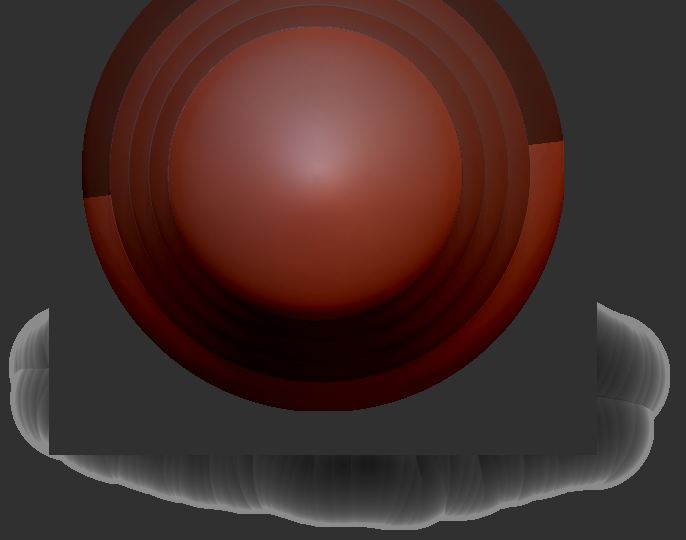
CantClearScreen.JPG

Re the first issue, shift + A is intended to switch between the zsphere sketching modes, that’s the default shortcut to switch between modes. To switch between preview of your skin and editing zspheres, simply hit A on the keyboard.

Rd the second issue, that bug has been happening since 3.5. Simply drawing out a new tool over the areas that the transparency got “left behind” will clear it.

Thanks for the reply. I understand what Shift+A vs. A is supposed to do. My point is that it isn’t doing what it’s supposed to do. The only way I could clear the screen was to close ZBrush. Now, if I open ZBrush and try to load the tool, ZBrush crashes! Again, the tool is simply 3 zspheres with two strips of sketched spheres.

Hello DocPit

ZBrush is just not clearing transparent meshes that have been dropped to the canvas. The next time you need to clear out the meshes that are transparent and left behind and CTRL+N is not working just do these steps.

  1. Redraw out the tool
  2. Do not put it in edit mode
  3. Now CTRL+N

All the transparent meshes should disappear now.

Hope that helps. You do not have to restart ZBrush to fix this one.Not sure why the other issue is happening though.

This is just an update to my earlier post. I’m not sure by what criteria the earlier post was “answered.”

ZBrush tech support suggested I reinstall ZBrush. In fact, I did a clean install of my Windows 7 64-bit OS (it was time), then I reinstalled ZB 4. Still, if I do even the simplest test zsketch, save it, then load it back into ZB, ZB will crash.

Googling “zsketch crashes” documents that I’m not the only one having a problem with zsketch. However, I haven’t come across any solutions. My solution, at this point, is to forget about using zsketch. If anyone having this problem does find a solution, I would love to hear about it. It is possible to zsketch on mannequins, and that would really facilitate the work I’m trying to do if it were stable. Note that the test sketches that crashed ZBrush were not mannequins. They were very simple armatures, e.g., 3 zspheres with some sketching just to experiement.

For the length of time it took to come out with ZB 4, it’s hard to believe that this problem didn’t reveal itself in beta testing.

Doc Pit