ZBrushCentral

Answered: Non-existant stretched vert messing up uv

There seems to be a vertex that’s stretched over the bounds of the uv map. Doing Morph UV shows that the error is at the side, but after I exported the lowest subdiv of this in max, I found no such erroneous vertex. There seems to be some sort of problem going on at the lips too–could just be that I have a small map, but just in case it’s related.

What could be wrong and how do I fix it?

Attachments
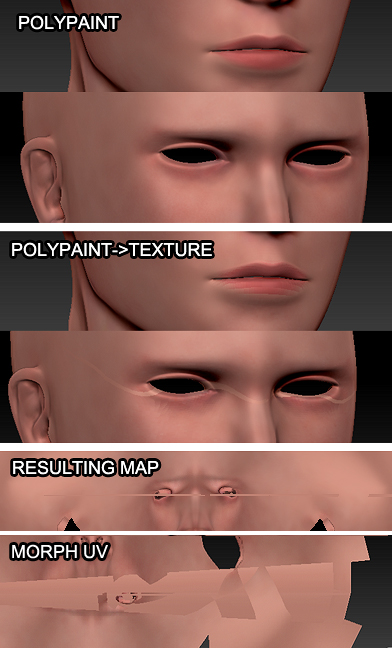
mess.jpg

The most common cause of the flying vertex is when a UV coordinate falls too close to the UV space’s edge. Not all programs register the 0,0 point exactly the same and ZBrush only uses a single UV space. So a point that falls too close to the edge can end up being misread as belonging to the opposite edge. As a result, it gets pulled across and drags everything with it.

If you install the Pixols to 3D plugin it has a ‘Scale UVs’ button that will solve this problem for you. (Don’t worry that the plugin is nothing to do with texture maps; that button will work, I promise you!)