ZBrushCentral

Answered: mirror sculpting not working anymore

HI all, I’m having a strange problem within Zbrush 4
I seem to recall having the same issue with 3.5 r3 just cannot remember how I sorted it.
For some reason mirror sculpting is not working with the same intensity on both sides of the axis using claytubes brush.
As I am sculpting on one side of the x axis there are parts on the other side of the x axis that do not match the left side.
Also edit > undo has stopped working.
There are no masks, and I am using a custom ui

Any ideas anyone?

Thanks
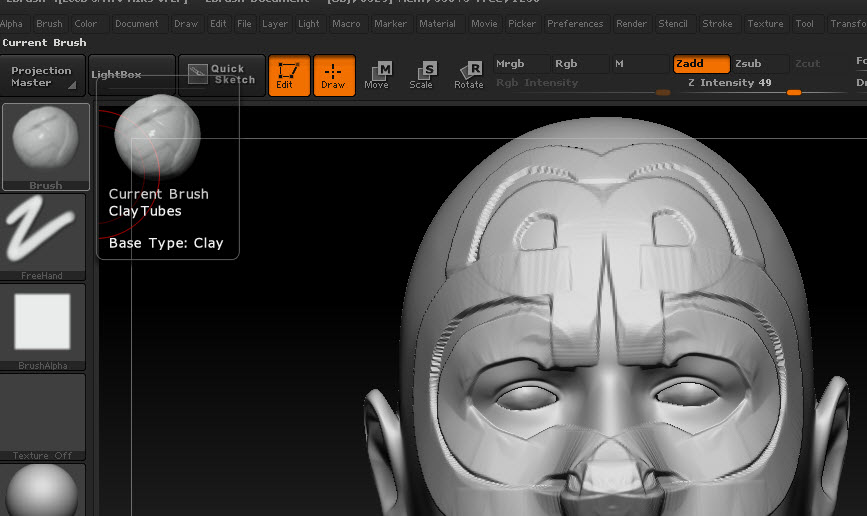
i CANT REPRODUCE YOUR ISSUE
is a model with symmetry? Is posable symmetry on? Is imported? Is the pivot point centered?

Attachments

CLAYTUBES.jpg

The model has normal symmetry applied, it was an imported obj from maya.
The sculpt was working fine until recently.
Pivot point is centeres aswell
I changed some ui colours and re-saved my ui config file and after that it seems to be weird when sculpting symmetry with claytubes???

Does anyone have any ideas on this…or has experienced it before…it only seems to be on clay tubes brush?

sorry, i cant help. No idea:cry:

Really weird, I exported mesh at highest sdiv level, into maya, centred pivot, froze transforms and cleared history and re-exported…same problem.
I tried on a normal sphere inside zbrush and that works fine which would suggest my mesh is dodgy?
But the mesh seems absolutely fine.
I’ve also tried re setting the pivot and clearing, and then resetting it again…i’ve tried unify under the deformation tab…there has to be some way of sorting this out?

OK…managed to solve it…if anyone else has the same issue try tool>unify and re-setting the pivots like I did… but if that doesn’t work look very very closely at your model cos like me you’ll find that it might have accidentally been masked and rotated at some point by the slightest of fractions!!!

How annoying!:eek:

Thanks…what a muppet!