ZBrushCentral

Answered: Mirror mask/Polypaint?

Hi, I made very precise mask on one side my model and I need to find a way to “smart resym” that mask or the polypaint.

I’ve already tried this: http://www.zbrushcentral.com/showthread.php?167256-Resym-polypaint&highlight=mirror+mask

but it’s not perfect. I get a bit of noise at the border of the mask.

Is there a better way?

Thanks!

Draw/paint the mask with symmetry enabled. You might be able to cut it apart, mirror then weld.

Sadly, I already did the polypaint work on one side only. And I have to keep the same topology.

It took a long time to create the polypaint for one side and there was no way to use symmetry with my method. It’s lines that follow perfectly the borders of my uvs.

PolypaintToMirror.jpg

This is a bit convoluted, but here’s what works:


  1. Use Zplugin >> SubTool Master to Mirror and append as a new SubTool. It will look funky now because you have overlapping polygons from the two SubTools fighting for the render. Don’t worry.
  2. If the model has multiple subdivision levels, delete the copy’s lower levels.
  3. Still on the copy, hide visibility of the half that doesn’t have polypaint.
  4. Delete the hidden polygons. (Tool >> Geometry >> Modify Topology >> Delete Hidden)
  5. Still on the copy, do a Size deformation of 1.
  6. Now switch back to your original SubTool. Turn Draw >> Rgb on and turn Zadd off.
  7. Use Tool >> SubTool >> Project All. Because Rgb is all that’s turned on, it will copy the polypaint from the duplicate SubTool but will not move any points.
  8. Delete the extra SubTool. You don’t need it anymore and your model will now have symmetrical polypaint.

Hi aurick, thanks for your reply.

I did all the steps like you said except for “do a Size deformation of 1”. I think you meant “inflat”. Size just scales the mesh from its pivot point and doesn’t align with the original mesh.

The one thing I don’t get is the “RGB” part. When you say “Turn Draw >> Rgb on and turn Zadd off.” do you mean these buttons?:
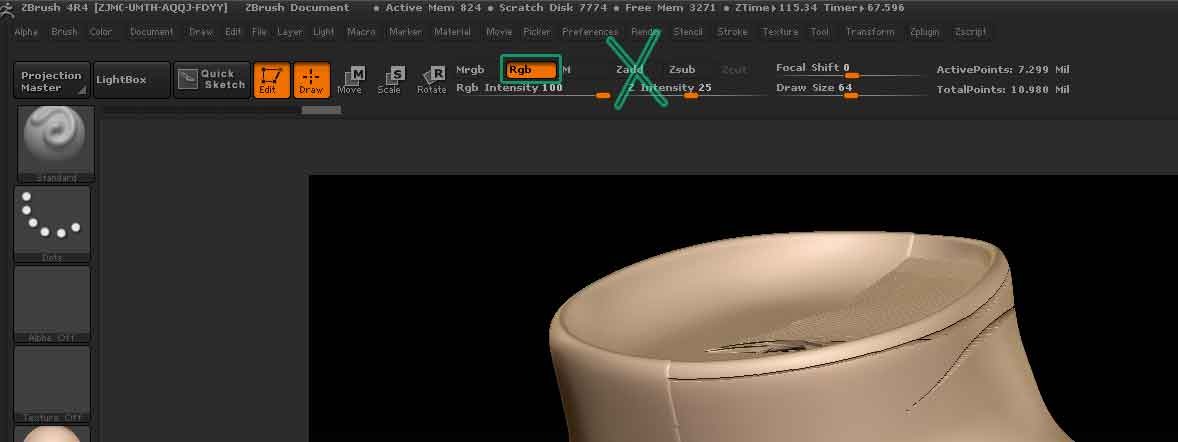
RGB_On___Zadd_OFF.jpg

When I did the projection it still projected the geo, not just the polypaint. But now that I think about it, all I need to do is store a morph target before the projection.

The Polypaint projection is near perfect. I think that if I inflat by less than +1 it might just do the trick.

Whatever the outcome, thank you so much for your reply!!

Ok, so I made sure to have a stored morph target before projecting and I inflated the copy by only .05 and it seems to have to the job.

I still have to fix some parts (some line are grey instead of black) but it’s all easy to fix from here.

Thanks again aurick!