Hello all, I’ve just started venturing into the world of zbrush. So far it has all been sunshine and rainbows but I’ve hit a snag and cannot find a solution (perhaps due to not knowing the right terms)
Basically I’m on my first model, I decided to start with something simple like a fish:
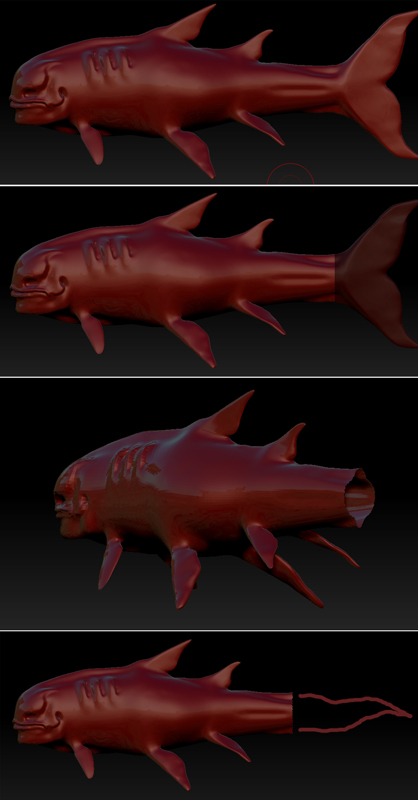
As you can see in picture one… that’s a fish.
In picture two I’ve selected the part I want to delete, I then deleted it.
In picture three, this is where my problems begin… I’m left with a gaping hole and I can’t seem to do much with it. I tried hunting through tutorials to no avail, I had a go at creating a zsphere and trying to add extra geometry to it, but that didn’t work either. Long story short I’ve been messing around with it for about 4 hours now and am losing the will to live.
Picture four is what I’m aiming for, a long tail that I can add spines to. I tried pushing around the mesh for ages but I always ended up with a really tangled mesh that no amount of smoothing could fix.
If someone can see a way around this and could offer a solution (in dummy speak) I would be very grateful.
P.S. The level of work on this site is amazing! It’s both inspiring and soul crushing at the same time.
Attachments