ZBrushCentral

Answered: DPsubpix

Hello fellow zbrushers
I’m new to the forum and I’m amazed by all the great artists featured here!
I’m working hard at my first post, in the meanwhile I have little tecnichal question…

in the Displacement Map Menu, what does exactly the DPsubpix slider control?

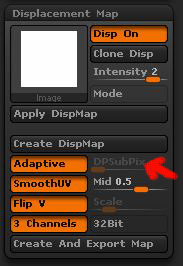
I’m asking this because I usually set it to 2 (mainly following tutorial tips) but with my last model, the slider is turned off! I can’t set any values in it.
Why is that? What does the DPsubpix exactly do and why, in my case, is it turned off?
(the wierd thing is I’d already exported a displacement map for the same model, using DPsubpix set to 2. Then I decided to go in for some more tweaking and now that I want to export the map again the slider is off and locked to 0)

if anybody knows how to help me…thanks in advance!

Attachments

DPsubpix.JPG

Hi everyone
I’m getting no love with this question :frowning:
but I will try and post it again because I really need to know!

Briefly, what does exactly the DPsubpix slider in the displacement map palette do?

I thought it was an alternative way of controlling manually the Displacement projection, instead of using the Adaptive button. But sometimes the DPsubpix slider is on, other times is not highlighted and uneditable.
What makes the slider switch to Off?

Thanks for any kind of help on the matter!

The DPSubPix slider controls the accuracy of the generated displacement map. Adaptive is a special calculation mode that in most cases enhances the quality of displacement maps; especially when the model has been sculpted with brushes that have the effect of moving points across the surface of the mesh. In ZBrush 4, the two options can be used together.

DPSubPix virtually subdivides the model to increase the number of points that are being calculated in creating the displacement map. For example, if you have a 1 million polygon model and wish to create a map sized 4096x4096 (which has up to 16 million points of data) you would use a DPSubPix setting of 2. This virtually subdivides the model twice during displacement calculation, resulting in 16 million points being calculated – a value that matches the resolution of the texture map. Higher values would add to the displacement calculation time without improving the map quality, because they would cause more points to be calculated than the texture could even hold. In short, only use DPSubPix when your mesh has fewer points than the desired map, and even then only use the minimum value that will match your texture resolution.

Thank you very much for your explanation, this will help me a lot in the future!

but still I don’t get why in my case the slider is completely switched off
I uploaded an image to show you

DPsubpix.JPG

do you know when this happens or why?

I’m afraid I don’t know why the slider would be unavailable. Does this only happen with one model? Perhaps there is something to do with its UVs which precludes the use of DPSubPix.

yes… it is quite strange
only with one model

the uvs are fine I guess, I already exported 6 maps working perfectly!
In fact I’d already exported a displacement map for this model, with ADAPTIVE ON and DPsubpix set to 2.
Then after a while I decided to go back to zbrush and add a few tweaks, but this time if I want to export the displacement map the DPsubpix switch is not working, it’s off.

I really don’t understand where the problem is…

Anyone at Pixologic could help?

thanks again marcus :wink:

Hello everyone
I hope the administrators won’t get mad at me for posting this question once again!
But I’m still looking for an explanation to my problem

This happens with only one of my tools.
When I try to export a Displacement Map, the DPsubpix slider is OFF, as shown in the image below

DPsubpix.JPG

This is very weird, I usually export my maps setting ADAPTIVE ON and a DPsubpix value of 2.

The uvs of the model are fine, I already exported Normal, Diffuse, Color, and Specularity.

Any of you ever experienced the same problem?

Thanks for your help

I’m not sure why DPSubPix is not available for this SubTool. I’ve not encountered that one before.

As for what it does and whether it’s needed or not, the first thing to ask yourself is how many polygons does the SubTool have and how large is your map? If the square of the map size is approximately equal to the number of polygons, then DPSubPix will give you absolutely no benefit.

As a general rule, a 1024x1024 map is about equal to a 1 million polygon model. A 2048 map is about equal to a 3-4 million poly model. A 4096 map is about the same as a 12-16 million poly model. (Exact mileage varies based on the amount of unused space in the texture – the areas that are outside the UV’s. Almost all UV mapping wastes about 25% of the available texture space.)

All that the DPSubPix slider does is virtually subdivide the model in order to get more points out of it. The fact that you’ve been using a value of 2 by default means that ZBrush has been dividing the model two more times before creating your map.

Is that worthwhile? Well, if you have a model that is 1 million polys and you wish to create a 4K map, then it would be. This is because the DPSubPix would take your 1 million poly model and divide it twice, resulting in 16 million polygons – equal to a 4K map. But if you’re only creating a 1K map then this setting is telling ZBrush to calculate 16 million points of data even though the map can only hold 1 million. You get zero benefit at a cost of a much longer calculation time. The same holds true if your model is already over 10 million polygons and you’re creating a 4K map. Any DPSubPix at all would be a total waste.

What’s more, most systems can easily divide the model to hit the 10-16 million poly range anyway. So you could divide the model yourself to get the same number of points that DPSubPix would give you. With modern computing power and ZBrush’s current limit of an 8K map, the only time you should ever have to think about DPSubPix is if you wish to create an 8K map. That is equal to about 50-64 million polys (depending on UV mapping), which is a level ZBrush can’t readily reach. In that case you would divide the model to the 10+ million range and then only use a DPSubPix value of 1. No higher.

Even then, you can still avoid DPSubPix. All you’d need to do is add a single HD level to your model, bringing it up to parity with an 8K map. Since Z4 can create displacement maps from HD data, you’re golden.

The bottom line is that you should evaluate the need for DPSubPix on a case by case basis. Yet even if you determine that you do actually need it for your current SubTool you can still bypass that need through regular division or HD levels. So while I can’t tell you why DPSubPix isn’t available in this situation, I should have at least been able to give you the tools here to make that a non-issue. :)
Thank you very much Aurick!

this helped me a lot, now I know how to “get around” the problem

I guess it was just some kind of bug… I started a new project yesterday and the slider was working perfectly

cheers!