ZBrushCentral

Answered: Double mesh issue, and question on subtools/dynamesh

Hi,
I’m pretty new to Zbrush and am having a bit of a time figuring out the subtools. I have a character, with boots on. I sculpted the boots straight onto a subtool (her sock-like things). I am having issues with the boots however; there seems to be some odd secondary mesh hidden within that pops out when you look at it from certain angles (I attached a picture!).
The problem here is that I sculpted the details on the socks etc so dynamesh ruins it, but I dont know how to fix the odd geometry otherwise. Is there a way I can cut the boot part off into a new subtool, or only dynamesh part of the subtool? I tried Qremeshing it with the sock area masked, but it still remeshed it (which I dont want it to do since it removes the details).

I would really appreciate help on this. Google didn’t help me :confused:
Hope I was clear as well, thanks for reading!

Attachments
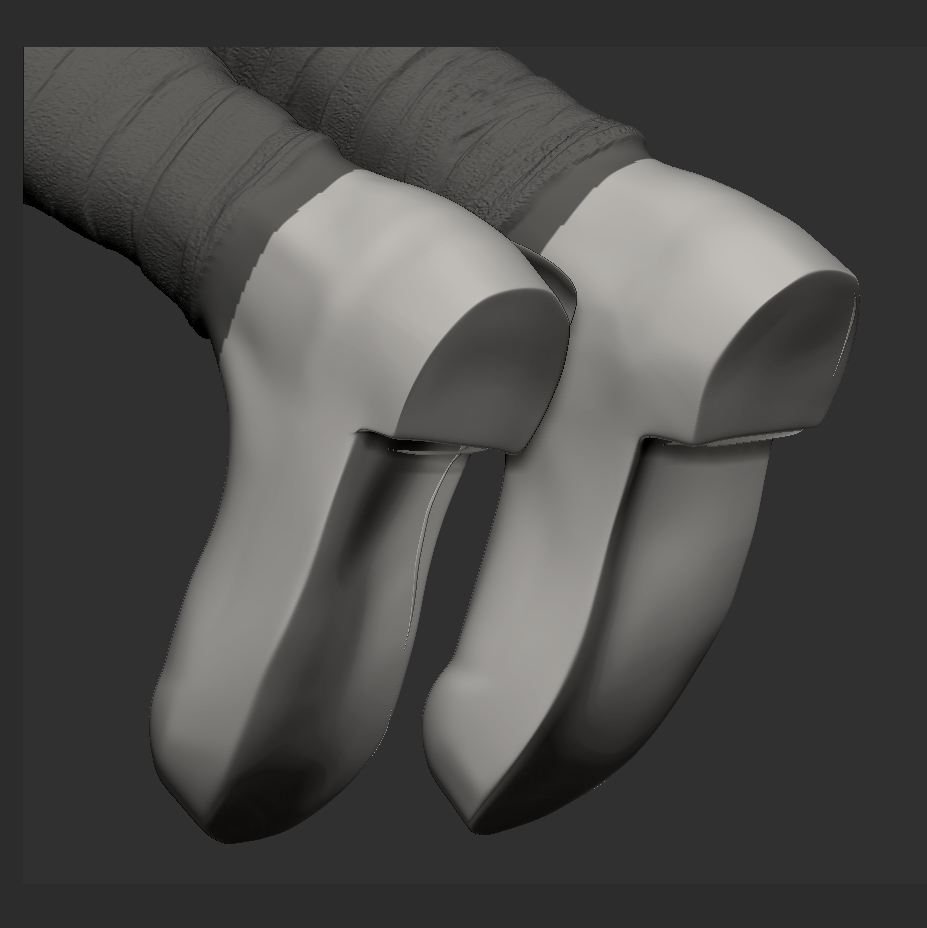
Gwahhhhh.JPG

I’m guessing that you created the boots via Inflate or Extract. The catch to that is your surface has faces that then intersect, which in turn leads to rendering artifacts.

One option would be to make the boots using the Topology brush.

Also, Remesh isn’t a lost cause. Just duplicate the SubTool, do the Remesh, then project details from the original model to the new mesh. Project All can be controlled via masking so you can mask off areas on the new model that you don’t want to receive details, then Project All to copy the details for everything else.

Hi, yes I did use extract. It’s given me some other issues as well -_-! Does Project-All actually “bake” new geometry onto the subtool, or is a seperate standing item?

http://www.pixologic.com/docs/index.php/New_Brushes%2C_Settings_and_Behaviors#Clip_Brushes
There’s also a good tutorial for cutting up a mesh, somewhere.

ZBrush has a number of projection features, including Project All. They all copy geometry and/or polypaint (depending on your Draw palette settings) from one or more SubTools to the current one. So yes, they bake it into the destination model. However, you can also create a SubTool Layer beforehand, aim which case the data will be copied to the currently selected Layer. You can then use the Layer controls to adjust or toggle the projected data.

Great, thanks for the responses guys! I duplicated the subtool and started sculpting on that one, and deleted the old except for the leg area that I wanted to keep the detail on. So I can remesh the shoes only :slight_smile: Cheers!