Hello there. I use Standart brush with DragRect as a Current Stroke.
Also there is an alpha. Everything ok when i deforming geometry - alpha is working.
But i have turned on an RGB mode and my aplha also effecting on my texture. I don’t want this.
So… how to make this alpha effect geometry and not texture painting at one time?
turn off rgb
olol, man.
May be u didn’t understand. I want my Brush’s Alpha to work with geometry and at the same not effecting on PolyPainting.
SO - with one action i want to deform my object with Alpha, and paint texture on it (though) DragRect Stroke without Alpha’s influence.:rolleyes:
:lol: This makes absolutely no sense whatsoever. The same with your first post, so I understand MichaelMaehring’s reply as that would have been my exact reply also. “What we have here, is a failure to communicate.” “a picture is worth a thousand words”
Strange, i thought my English good enough to explain what i want.
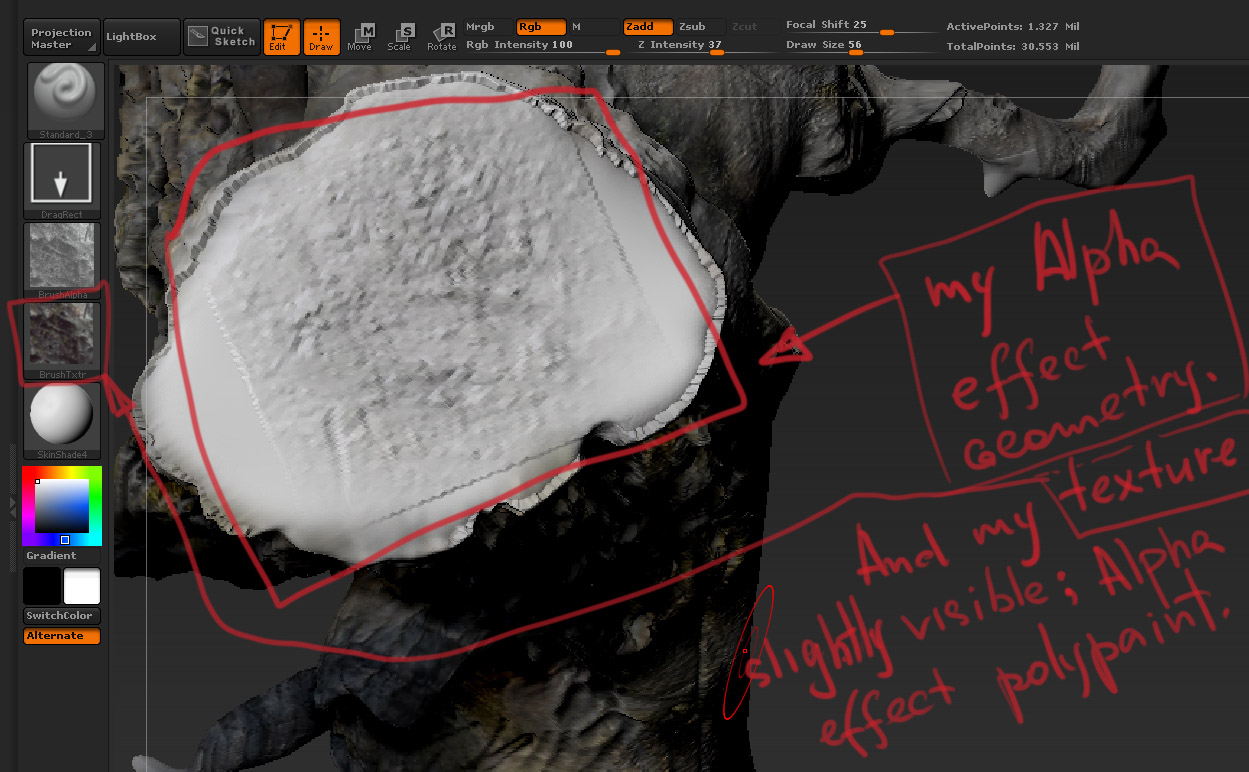
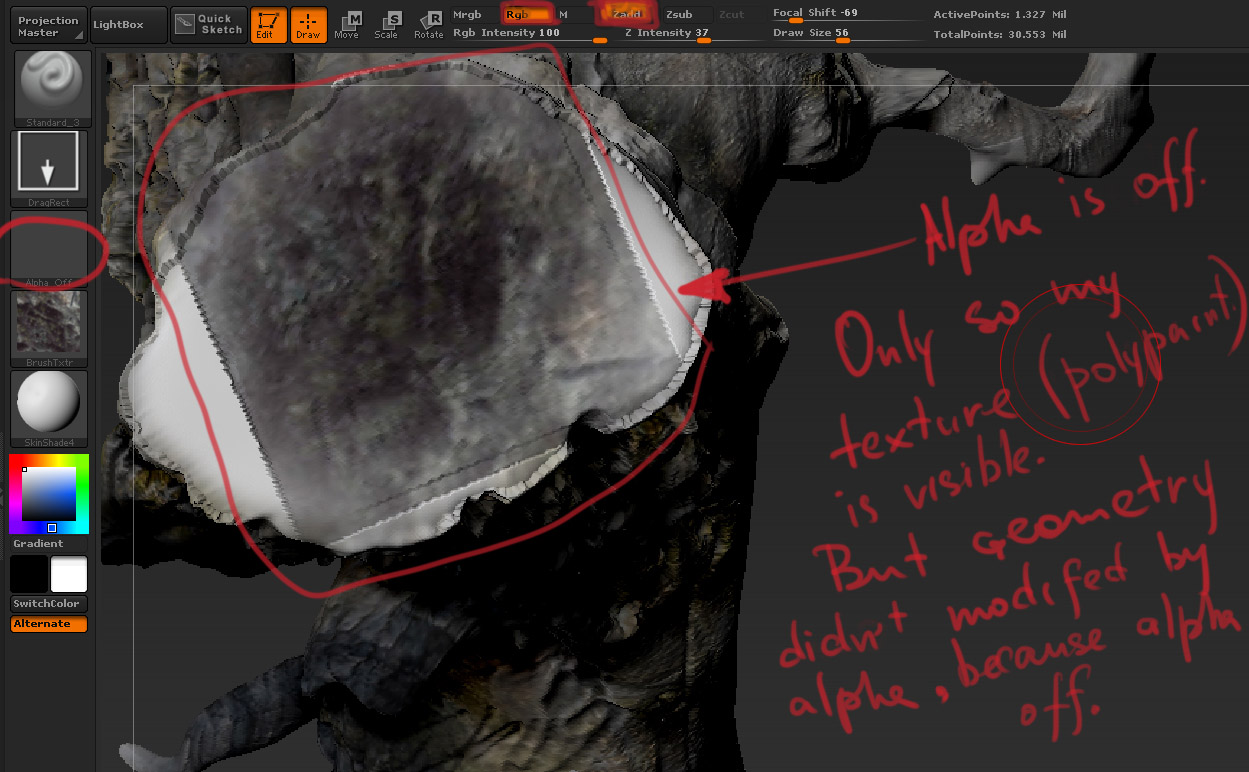
Ok. Pictures then.
I want to combine this to things in one movement of my brush.
(the next stage of explaining is youtube))))) :lol:
Attachments
hi
in your first post you write: “So… how to make this alpha effect geometry and not texture painting at one time?”
in your last post your write: “I want to combine this to things in one movement of my brush.”
that´s the contradiction
i have to agree that the concept of alphas and textures might be a little bit confusing. first, there is the distinction between a texture you use to paint with your brush, and a texture that is applied to your model.
#the texture that is applied to your brush is selected via the texture menu (main menu)
#the texture that is applied to your model is selected via the tool > Texture Map menu
also polypainting won´t have an effect while you have a texture selected in the tool > Texture Map menu
one more thing to notice is that the brush falloff (focal shift) will effect the alpha, thus geometry, while applying it with the brush
maybe your error has to do with one of these basics

m
a
n
…
U didn’t understand me again. NO contradiction.
“So… how to make this alpha effect geometry and not texture painting at one time?”
“I want to combine this to things in one movement of my brush.”
-> I want my alpha to effect only geometry, not polypainting.
I just posted two pictures: one - with polypaint without effecting alpha (alpha off). I placed texture there.
the second - alpha effect on geometry and polypaint, so because of alpha my texture
is slightly visible. Damn…:o U’ve written about things which i already knew.
ok, now i understand
as soon as you select an alpha your texture isn´t polypainted properly
your focal shift is 25
what happens if you reduce the focal shift to -100?
MichaelMaehring, open Zbrush and try )))
Alpha is the main issue. How to polypaint without Alpha, but with all other stuff i was talking about…
“How to polypaint without Alpha, but with all other stuff i was talking about…”
“So… how to make this alpha effect geometry and not texture painting at one time?”
“I want to combine this to things in one movement of my brush.”
“I want my alpha to effect only geometry, not polypainting.”
ok, i have to pass :rolleyes:
if somebody else understands you, i´m shure he/she will be glad to help
thanks for discussion anyway )))