ZBrushCentral

alpha quality

I created in Photoshop an alpha (1k), painted it on a texture plane (8k) but the result looks not propper. The attached jpeg shows the difference between the original on the left and the result of Zbrush on the right side. The plane I painted on has reached the max number of polys, but while painting as texture -> this should be irrelevant, not?

What am I doing wrong? Can you help me with this?
Thank you!

Attachments
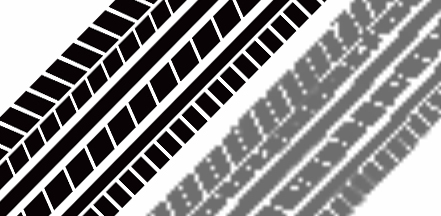
compare_stroke.jpg

What is a “texture plane”? What do you mean by “texture plane”?

In the tool palette, you find a menu ‘Texture Map’ when you imported geometry.

If you want to paint directly to Texture, then you will have to use Projection Master. Doing it this way doesn’t matter how many polygons your mesh has because you are not painting the mesh(tool), you are painting the Texture Map. The other kind of painting in ZBrush is Polypainting which relies on mesh resolution. If you are polypainting and it still looks blocky, then you have to subdivide the mesh more to improve it. Just consider 1 polygon as 1 pixel.