ZBrushCentral

all gone black!

its all gone black! aaaaahhhhh.

so I have a model, I started to poly paint, I have several tools making up the model, all with different materials and Im painting colour over the top of those.

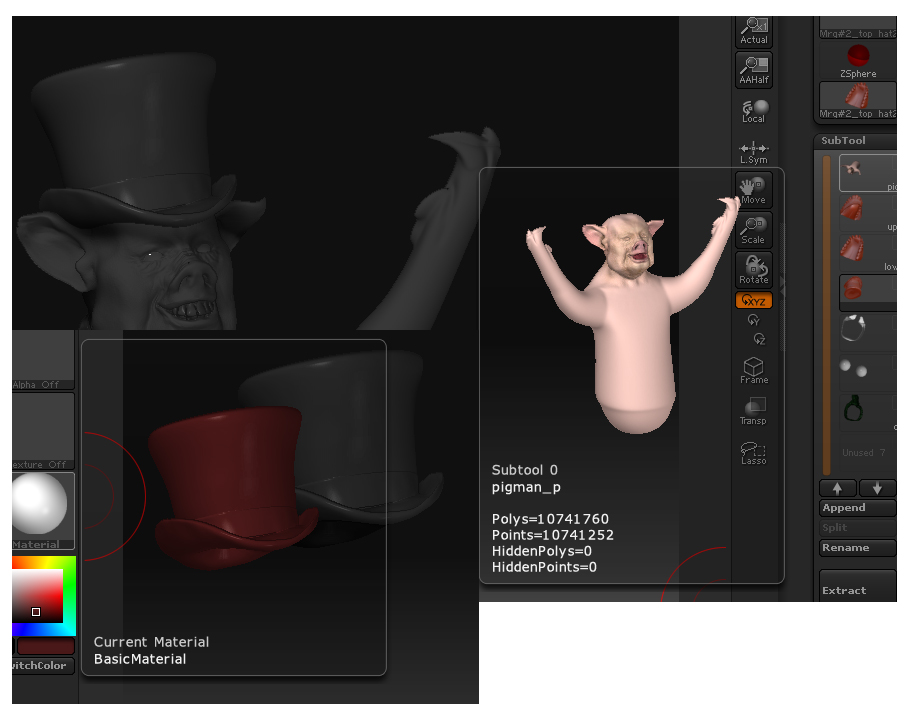
although the tools show as coloured in the previews, in the frame they are all black! how pants is that! have a look at the image and see if you can work it out because I cant.

in the image there are 2 screen sections, both show the preview model in colour and the frame version in black.

thanks in advance.
steve

Attachments
black_pig.jpg

Are they masked? Try Ctrl-Shift-A.

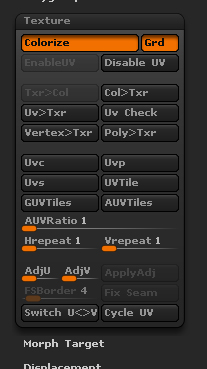
Check that the ‘Colorize’ button is switched on in the Tool>Texture submenu. Your model is taking on the selected color.

thanks… but no go, they arnt masked, and colourize is on, if I switch colourize off the generic red clay appears under the black. have attached image of colourize pallet incase anything else is wrong on it, please check it for me.
thanks

Attachments

colourize shot.jpg

With Colorize switched off then there are basically three things (I can think of) that could be causing this:

  1. Color is set to other than white.
  2. A gray texture is selected.
  3. The mesh is masked.

If you still have the issue after checking those then I suggest you save your model with a new name and re-start ZBrush.

sadly none of the above has had any effect.

this is the only tool its happening to. all my other models are fine, which leads me to think its something I have inadvertantly done in the process of colouring the model.

…desperation…
steve

can you do a col>txr?

if so, grab the texture.
export out
grab the highres and export that out as well as the low

import model low
subD up to high poly count
import high

apply the texture
txr>col

That should get you back to where you want to be…unless col>txr doesn’t work that is.