ZBrushCentral

Advice from Experts :)

Alright, I am reaching out to all of you that are far superior than me for some free advice about some things regarding workflow and the various pipelines.

I will start off by saying Zbrush is a gem!

I will give you some background, I am a photographer who got into 3D when I realized how limitless it was, the potential is far beyond anything in the photo world, regarding the type of work I want to produce. Which would be combining photography and 3D together.

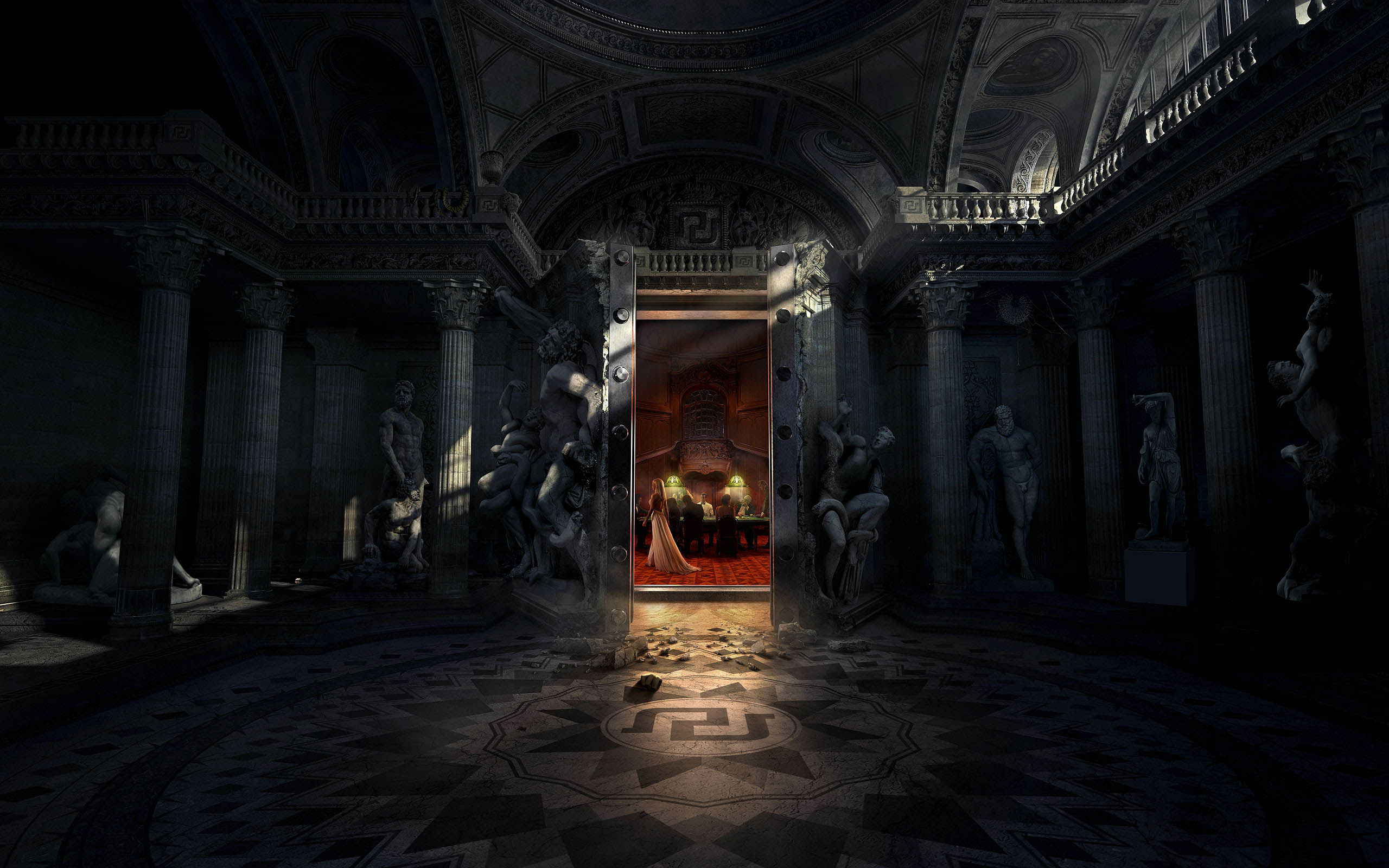
For Example, this image is a good representation of what I would absolutely love to create(now I am not sure but I believe that this image is 3D and photography all wrapped together)

I would love to create a 3D environment and photograph in a studio my subjects and then mesh them together. (this image is from Platinum FMD, an agency that pumps out some amazing work, I highly recommend checking out their stuff.)
I want to know the best methods/software/workflow that would get me a solid 2D image that I can work on in Photoshop. For Example would you recommend texturing and painting in something other than zbrush?
My current workflow is Maya 2014/Zbrush/and Mental Ray.
I hate uv maps, normal maps, and displacement maps, but I am learning how to use them, they are kind of a pain in the butt. If any of you have any alternate ways that make the workflow less stressful that would be great to know.

I am just looking for some friendly advice to make sure that I am headed in the right direction. Thanks:D:D

Oh I coud go on and on for days about how beautiful this image is by the way, so freaking awesome!

Attachments
PFMD1.jpg

No advice yet from any experts? Well that sucks. I want some advice too, but i can tell you from my own experience that is better to do the mesh work and use poly paint in Zbrush and render in Maya if you are going to be blending in 3d with Photos and then finish everything in Photoshop. As for UVs, is never easy but there are some awesome software out there to make your UV workflow easier, specially http://www.uvlayout.com/. Sometimes you don’t have to do anything besides clicking a few buttons it does all for you. That is if you can afford it, but definitely get the free trial and you’ll see what i’m talking about or go on you tube and watch people using it. Believe me i wanted to just learn one software at first and do everything in it, but if you want to be a good CG you have to learn to use as many tools as possible ( as long as they fit your needs).

Hey thanks for the response! I know I was really hoping to get some advice from somebody who had more experience then me which is a lot of people. But its all good. I have figured out a lot of things on my own,
and thanks for the link I will check that out as UV’s are really the only thing now that I dread, just because it is so time consuming, which is time that I feel like I could be putting into sculpting and painting. I really like
how the industry (especially Zbrush) are fixing their software to better fit the artist. You still have the technicality of it all, there is no one click does all button, but at least there are fewer hoops you have to jump through
to get to the final product. I am really excited to keep learning. Thanks again for the advice :slight_smile:

-Tyler