ZBrushCentral

Adding fine/sharp details to a high poly model - Unsolved

Hi,
I have a fairly large object, I can only Subdivide it to level 5, more than that and zBrush crashes…
I’m trying to add fine/sharp details to it but I just can’t seem to work it out…
If I use Projection Master and add a very sharp square bevel and then drop the object back to the canvas the sharp square becomes a bit blurry…
I tried sharpening the edges of the beveled square with Pinch but that didn’t work…
How can I add such sharp details in this case?

Thank you.
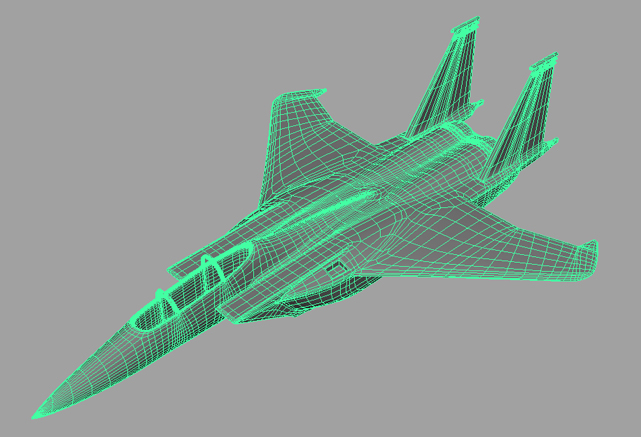
It seems that the poly-resolution is not letting you sculpt detail (the blurry corners when projecting) ¿Have you tried using subtools? ¿Are you modeling the base mesh in another app? ¿Could you upload a pic?

how many poly’s are you working with? if they are too high u might not have enough RAM to deal with it. you may need to split it up into subtools to go higher

I did model the basemesh in another program (Maya).
I have 4 GB of Ram.

I understand the model has too many polygons if I subdivide it but how would I go about adding crispt details to it?
It already has a UV layout and all parts in the complete model (missiles, engines etc…) are split into subtools.

Can I split this 1 mesh into subtools within ZBrush somehow?
If so, will I be able to subdivide each part further? would it not harm the UV layout and how would I go about combining the parts later on?

Thanks guys.

Attachments

basemesh.jpg

Splitting into SubTools is as easy as going to level 1 and hiding the part of the mesh that you want to split away. Then you use Tool>SubTool>Split. This will not affect the UV layout at all. So there’s also no reason to combine the mesh later. You can simply create maps for the various parts and merge them in a photo editor.

Keep in mind, though, that your map is limited in how much data it can hold. A 1024x1024 map can only hold about 1 million points of data, which is equal to a 1 million poly model’s detailing. A 2048x2048 map can hold about 3-4 million points (depending on the UV’s). A 4096x4096 map weighs in at about 12 million points.

What this means is that if you need to subdivide your model past 12 million total points to get the detail you need, then you’re going to need multiple maps to hold that detail. That means breaking the UV’s into multiple regions/spaces. If you then bring the model into ZBrush you can use Tool>Polygroups>UV Groups followed by Tool>SubTool>GrpSplit to break the model into SubTools based on the UV regions.

There is something I don’t understand…
Even if I take an extremely simple object and Subdivide it as much as I can before ZBrush crashes I can add fairly crispt details… however they are no where near as crispt as the details in the attached image (made by Sebcesoir), which has a much more complex mesh… how come? and I use high resolution sharp alphas or masks which look perfect in Project Master so it’s not that the alpha is blurred or anything :confused:

I’m using Vista 64 Bit with 4 GB of RAM and Nvidia 9800 GTX video card.

Thank you so much for your help :slight_smile: