ZBrushCentral

Adaptive skin produces broken mesh

Hello guys,
I am very new to sculpting, now I am busy with my hard-surface robot.
There is a problem here, I create zSphere -> Edit Topology -> Map the edge flow and vertexes -> Preview…
and it shows me broken topology. If I maintain positive direction of mesh creation, everything goes good, but I need negative extrusion, then it breaks. I want to have inward thickness, but something doesn’t allow me to do that.
Mesh appears to be kinda twisted in itself.

Many thanks for the suggestions!

pics or it didn’t happen.

My guess is you’re trying to do an extrusion with 4 sides. Zbrush doesn’t under stand that topology flow for some reason. Add 1 or more edges to that extrusion and you’ll probably be good to go. But, without an image, I’m shooting in the dark here.

Take smaller steps, eg. Make an adaptive skin and model it that way before you try to get fancy the other way :wink:

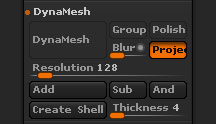
Perhaps “Tool > Geometry > DynaMesh > Create Shell” might suit your needs. Below is a quote from the Online Docs.

4R5-Tool-Geometry-DynaMesh.jpg

Create Shell

You can create an internal thickness within any DynaMesh by first inserting a negative mesh (Sub). Clicking the Create Shell button will then place a hole where the Insert brush was used and an internal thickness will be added to the whole DynaMesh. The Thickness slider (below) will let you change the size of the thickness, which is inward from the mesh surface. (In other words, it will be inside the model rather than inflating the surface.) This tool is perfect for people who wish print their models in 3D as it will reduce the amount of material for printing and so reduce costs.
If you do not wish to have a hole when Create Shell button is pressed make sure to move the negative inserted mesh away from the mesh before remeshing. It will then be ignored when creating the shell.

Thickness

Defines the thickness of the shell in relation to the resolution of the DynaMesh.