ZBrushCentral

a very VERY strange idea...how do I accomplish this?

Hello all.

I would like to very much use my ZSphere sketch as an actual mesh. In other words, I DON’T want to “skin” the ZSphere mesh…I would like to use the sketch “as is” and make it a mesh that can have a UV map etc. without changing the bubble-like look. Of course, it would have to have a topology (which ZSphere tools do not), so is there any way to “convert” this ZSphere sketch into a semblance of a mesh without changing the bubble-sphere look of it?

I hope this makes some kind of sense…

Thanks for the suggestions.

I would think you can’t. You’d have to skin it but with a hi resolution so that it would adopt the buble like surface.

Man, I hope this isn’t true. I was hoping to hear there was an easier way to go about it. I also like the look of the Zsphere as a mesh. It lends itself well to a techno organic style.:cry:

There are a couple of things you can try.

  1. The ZProject brush will project from the zspheres to your mesh. What you’d do is create an adaptive skin of the zspheres and then append this as a subtool to the zspheres. With the skin subtool selected you use the ZProject brush (with just ZAdd/ZSub on) to transfer the shape of the zspheres to the mesh. This is a bit of a fiddle though. You will have to ensure that the mesh has enough density - it may need subdividing - and also the ZProject brush only works on the normals facing towards you, so you have to keep turning the mesh and not going over the edges. You may need to switch between ZAdd and ZSub (you can hold Alt to toggle) to get the best results.

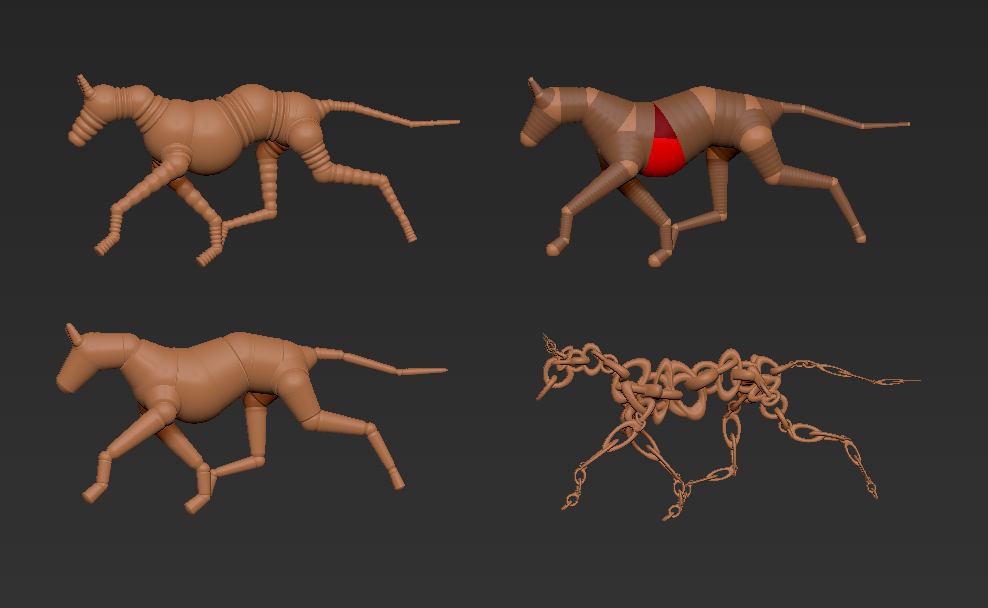
  2. Alternatively you can use the little plugin here: http://www.zbrushcentral.com/showthread.php?94752-Useful-small-ZScripts-and-Macros-for-ZBrush-4-amp-4R3&p=743193&viewfull=1#post743193 This will automatically insert meshes wherever there are zspheres/connecting spheres. It is effectively the technique used for creating mannequins. You can create a scultpable mesh by following the instructions here:

http://www.pixologic.com/docs/index.php/Mannequins#Sculpting_Mannequins

I’ve attached the sphere and connector meshes I used in the image (the chains included are with the plugin).

Attachments

Dogs.jpg