ZBrushCentral

A problem with ZMapper's UVs?

Hi,
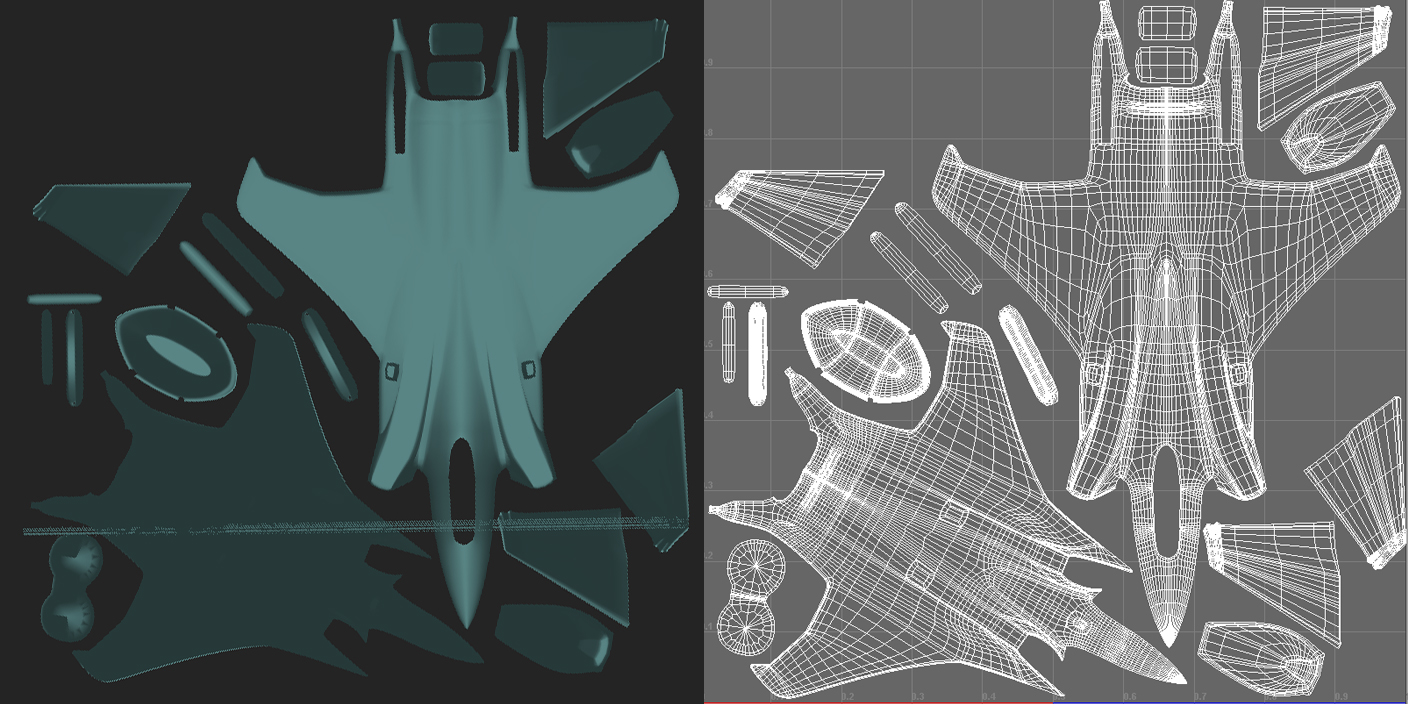
I have this UV layout made in Unfold 3D and then modified in Maya,
for some reason, when I check it in ZMapper there is a smudge across the layout as if there are a few misplaced vertexes…
I made sure in Maya that everything is fine, merging all close points together, trying to grab those invisible perhaps misplaced vertexes in the UV Editor but it just seems fine in Maya…

Why does the ZMapper show that problem?
I’m afraid to start working on it, thinking perhaps it’s nothing and then see some uncorrectable problems…

In the image you can see the way the UV layout looks like in Maya on the right side compared to Zbrush on the left.

Thank you !

Attachments
PLANE_ZBRUSH_UV.jpg

the problem is becuase the right part of the uv´s are overlaping with yhe border, put it inside and the problem will go :D:D

MY DOMINANCE WAR IV - BARATHOR

Agreeing with Sephirothsam’s conclusion!
I’d like to add that it’s never a good thing to scale your UV’s that closely to the border of the 0-1 tile. Always leave a comfortable gap around it and around each and every shell. That way you can have a decent amount of overpaint across the edges of the shells.
Render engines can sample for texture information beyond the uv shells for all kinds of filtering purposes. If your background colour is vastly different to the colour of the pixels on the edge it will taint the value of the texture look-up resulting in visible seams of nasty colours or displacement errors.
If some form of mip-mapping is employed it will only exacerbates the problem.

Thank you !! :smiley: