ZBrushCentral

3ds Max 2012 -> GoZ Runtime error (solved!)

OS: Win 7 64 Pro
ZBrush 4
3ds Max 2012

After installing GoZ it works great with Photoshop ExtendedCS5, however I am now getting a script error every time I launch Max. This error appears by launching Max via theGoZ button in ZBrush, or by simply starting Max up on its own. The error is below.
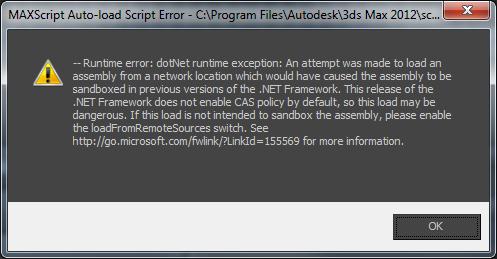
3dsMaxError.jpg

To try and fix this I have reinstalled all of the GoZ components and restarted. I also tried the manual install outlined in the .pdf that came in the GoZ .zip file. Does anyone know of a solution to this?

Thanks,

-Adam

By the way, removing this file:

Macro_GoZ.ms

from C:\Program Files\Autodesk\3ds Max 2012\Scripts\Startup stops the error from occurring. Is this the correct location for the .ms file? Do I have the right version of this file?

This is something we’ve been investigating. So far it seems to be related only to Max 2012 so it could be something different that they did with the app. One thing I’d like you to do, though is ensure that you have the most current .NET Framework installed. You can get it here: http://www.microsoft.com/download/en/details.aspx?displaylang=en&id=17851

Hi Guys, solved this problem with 3 hours of frustrating searches.
Most 2012 products now use the 4 release of the .NET Framework systems.

Meaning, security is might tighter when the files are being downloaded from he net, or are third party.

When you download any file, especially a plug in as a .Zip you should “Right Click” on it then selecting “UNBLOCK”. Then, extract the files, and set up as instructed your choosed Plug-In.

On right click, there is no default option for unblock, however, there is if I right click, select properties, then select unblock. And confirmed, this does solve this for me as well :slight_smile: