ZBrushCentral

3D printing/prototyping, mesh setup question..?

Hi all…
Thanks in advance for looking at this. Sorry if its a simple question.

3D printing/prototyping… I’m looking to print/prototype a model currently made of multiple subtools that will be merged and exported as an STL file.
I have done some research and checked threads and tutorials.

Jeff Feligno’s video series is great and informative
http://www.pixologic.com/zclassroom/homeroom/lesson/prototyping/
Video 4 shows what I’m looking at
http://www.pixologic.com/video/video-v2-zcr.php?videoname=http://www.pixologic01.com/zclassroom/homeroom/lessons/videos/prototyping/prototyping-jeff-feligno-part-5.flv&w=1024&h=576

… but i still have a question about the mesh setup.
Jeff’s tutorial suggests to me that as long as 2 meshes intersect completely and the model is ‘watertight’ then your good-to-go. He does have meshes/subtools that are open internally and some that are sealed (creating pockets). Neither seam to be a problem.
I have seen other forum posts and discussions that make the process seam a little more complex regarding single meshes that must have no intersections between surfaces of a single mesh or of multiple merged meshes/subtools…

below is a quick image to illustrate so you don’t need to watch the vid to know the options I’m looking at…

My question concisely… Which if not all of the above options are good or have issues?
Any other pointers on the subject are also welcome.

Thanks!
Phil.

Attachments
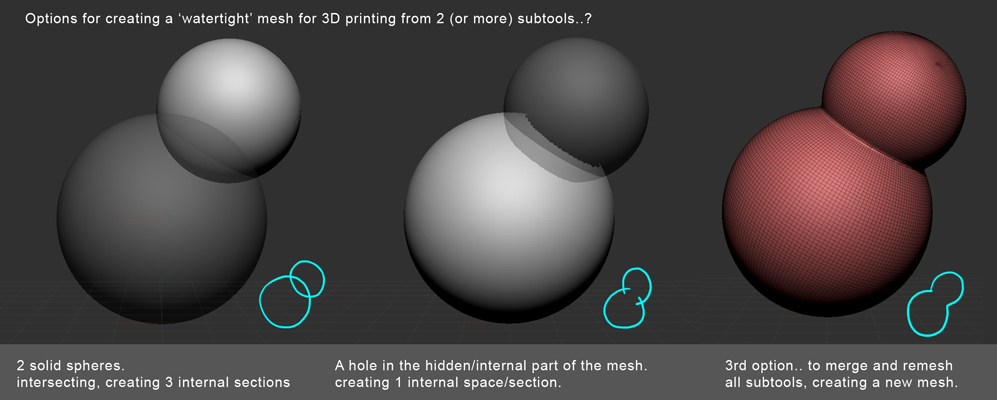
3d_print_options.jpg

They are both fine. You can’t have any holes in the mesh…it needs to be a water tight skin all the way around.
Not to say that you can’t have individual parts.

Here is a great tutorial by one of the best in the biz…an old one but still valid

http://www.idolworkshop.com/2010/02/golden-oldies-3d-printing-how-to/

Thanks jmenna,

that’s impression i get, certainly from the Feligno vid.
I had seen the Mary Jane thread also and it was the mention of programs like Magics to remove overlaps and unify the mesh that got me thinking.
I have also had feedback from a prototyping company and i belive they can manage that side of things with programs like Magics as part of their setup process.

So its becoming clearer…
Thanks again for your help.

Phil

Ive made hundreds of models for 3d print, the answer to your question is that both are fine. except, some printers do not like stls with more than one shell and will have trouble with them, so it really does depend which printer is being used.

personally I always attempt to use as few shells as possible as it creates fewer problems. I will sometimes use the higher res dynamesh function to achieve this, as you have in your image.

sometimes I just send the file off for fixing in magics or nettfabb. netfabb have a superb cloud based service which achieves this in minutes, and its free. http://cloud.netfabb.com/ magics have a free online service too but its slower as its not automated.

some printers like to have 2 or more shells where the support is to be removed by hand, for example the envisiontec multilens or ultra can print the support structure or sprue in the same material as the model but softer than the actual model, use one shell for the support and one for the model and just tell it how hard to print each part.

some printers like the solid scape machines http://www.solid-scape.com/solidscape-3d-printers dont care how many shells there are as long as they all intersect, it just views them as a whole.

feel free to drop me a line if you need help with any of this stuff.

steve