ZBrushCentral

32-bit displacement map creation problem

Hallo,

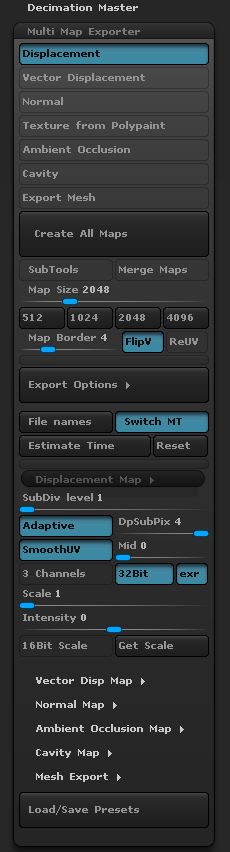
I have an problem to create 32-bit map with Multi Map Exporter. When I set my setting and I hit Create All Maps button. The creation of the map goes fine, zbrush creates the file. But I cant open this file every time I create one.

I get this warning message:

"Error reading the file <“name of the file”.tif> "

When I generate 16-bit map. I have no problems.

This are my setting for the Exporter

Attachments
saveSettings.JPG

Are you using the floating license version of ZBrush?

no we have it only on one computer. Do you think its something wrong with license.

No, it’s an issue that has been reported before but only with floating license. Can you try using the Tool>Displacement Map>Create and Export Map button to export a 32bit tiff directly from ZBrush? I’d like to know if the problem also occurs.

Also, what are you using to open the tif files?

Thanks,

yes I can create 32bit map with regular displacement tool. But still I can open it.
This is weird, I can open it in Paint and Windows Photo Viewer. But I cant open it in photoshop or XnView. Even when I open it with Paint the map looks weird. When I put the map in 3DsMax it allows me to do it, but I cant view the map inside the max. It does not show in view-port aether.

this is how the map looks in paint. Map has smoothed iv, DPSub4, Adaptive, 32bit. The hand has 2.7mil polys in highest level.

hand show 32 does not work.JPG

edit: we tried also in NUKE which opens it but looks the same as in paint. Than we tried to open it in Gimp and PDPlayer it did not work aether.

OK, thanks, I will pass this information on to the developers.

I just want to point out that last image of the hand I posted looks bad because of flipped[bad] uvs on the objects, that’s why you see all the polygons on the map. I already fixed this problem. But still i cant export 32 bit maps.