ZBrushCentral

2 layers from mesh extraction?

Hi guys, I seemed to run into a problem while trying to do a mesh extract. As you can see I have two separate layers, obviously I only want one. This happens when I tried extracting from the “Clothing” layer. I’m thinking its extracting from both sides of the mesh, but the problem still happens when I select “Project Outer Vertices.” Does anyone have any idea why this might be happening? Thanks

Attachments
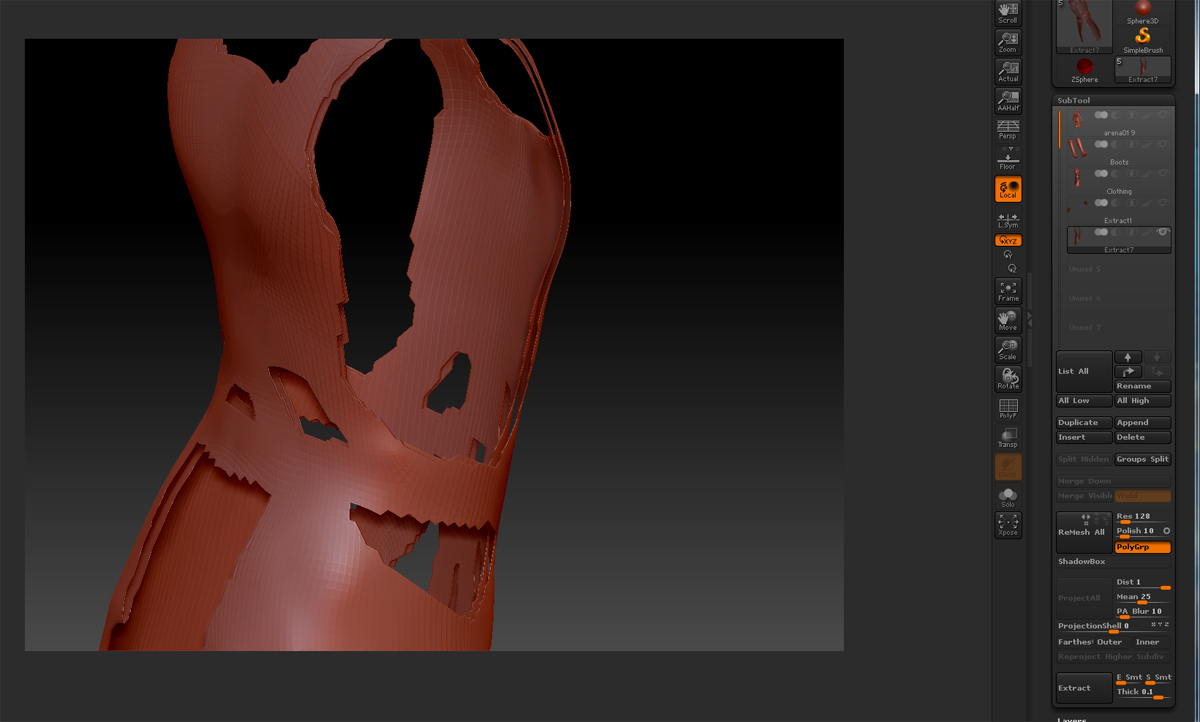
error.jpg

Is this an extract of an extract? When the mesh you are extracting from is double-skinned (has thickness) then you will get this result. You can avoid it by:

  1. Turn on Tool:Display Properties>Double. This means you will be able to see backfaces which helps with the next part.
  2. Turn on polyframes (Shift+F). This shows different polygroups in different colors.
  3. Shift+Ctrl+click on the front face of the mesh. Because the backface and the edge are different polygroups these will be hidden. (Note the backface may be the same color as the frontface but it will be a different group.)
  4. Paint your mask (if necessary - the method will work if you already painted it) and do the extract.
  5. Shift+Ctrl+click the background to show the whole mesh again.