ZBrushCentral

2 Issues I cant solve!!!

I’m am new to ZBrush, trying to learn everything I can. Currently I am going through ZBrush Character Creation: Advanced Digital Sculpting and the author refers to a tool called BrushMod and it shows it in his UI by his brush settings like Z intensity etc. I cannot for the life of me find this!

Second issue I am having is when I sculpt I am seeing some weird distortion/noise in my model. I cannot get rid of it. Sometimes it looks like little spikes protruding from my mesh. This seems to happen to me a lot so I must me doing something wrong.

Sorry if these a noob questions.

P.S. I am using ZBrush 3.5 R3.
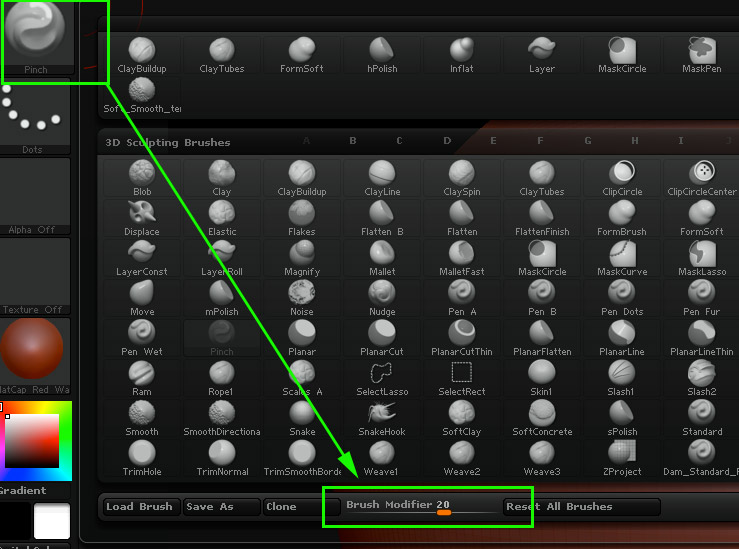
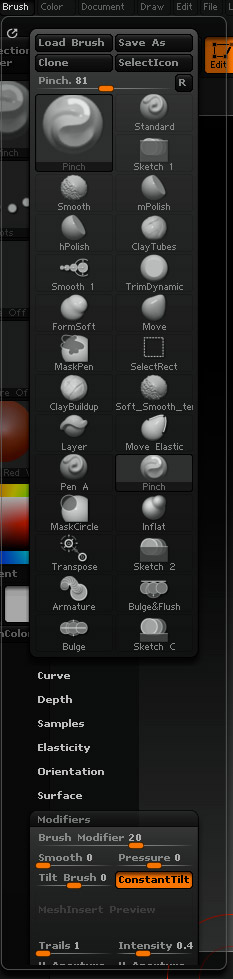
I think the BrushMod-setting is only available for some certain brushes, like the Standard brush for example. It kind of gives the brush a pinch effect. You’ll find the “Brush Modifier” in the menu (Brush->Modifiers->Brush Modifier) or in the bottom of the brushes popup window.

// tennet

It was supposed to be under the pinch brush but I could not find it.

Bumping for additional help!

Hi! Attached screenshots shows where the ‘BrushMod’ command is found. You can create a Custom UI and put it in the top bar (along with Zadd, ZSub…) if you want it to look like in the book.

Can you upload an image that shows the noise in your model?

// tennet

Attachments

brushMod_BrushMenu.jpg

brushMod_menu.jpg

Brush Modifier will do two things IIRC

A positive value will give it a Pinch and negative value gives it an inflation (this is for the standard brush only). For all the other brushes, it determines the height of it.

As for the noise, do you have noise enabled for your brush? Check under Brush -> Surface -> Noise. What about topology? Is Cavity Mask enabled? A picture of the problem might help.

Thanks that explains the BrushMod issue.

As for the noise, perhaps that is not the best word, it looks more like my faces have all been so pulled and pushed etc. that they are just permanently distorted and cause clipping between other faces and won’t sculpt the way I intended. Granted this is probably due to me being a complete noob so I should probably just start over.

<img src=“http://www.zbrushcentral.com/pixo/atn.gif”>

Here is some of the stuff I am seeing. I guess it could be described as pinching.

Image is not working for some reason, however, I would suggest using the Smooth function in the Deformation panel, or try and using one of the Stronger Smooth brushes (Valance, Stronger, Sub-Division smooth brushes will all do the trick) and see if your model doesn’t correct the faces.

You could also use the Relax function in the Deformation panel, if this one doesn’t help, then there is indeed something wrong with the model.

If the model is a complicated base model, then go to the lowest SD level and delete the higher SD’s, if the faces still have problem, then a start-over could be in order.

Thank you all so much :slight_smile: I am going to try all these and see if I can’t get it fixed :slight_smile: