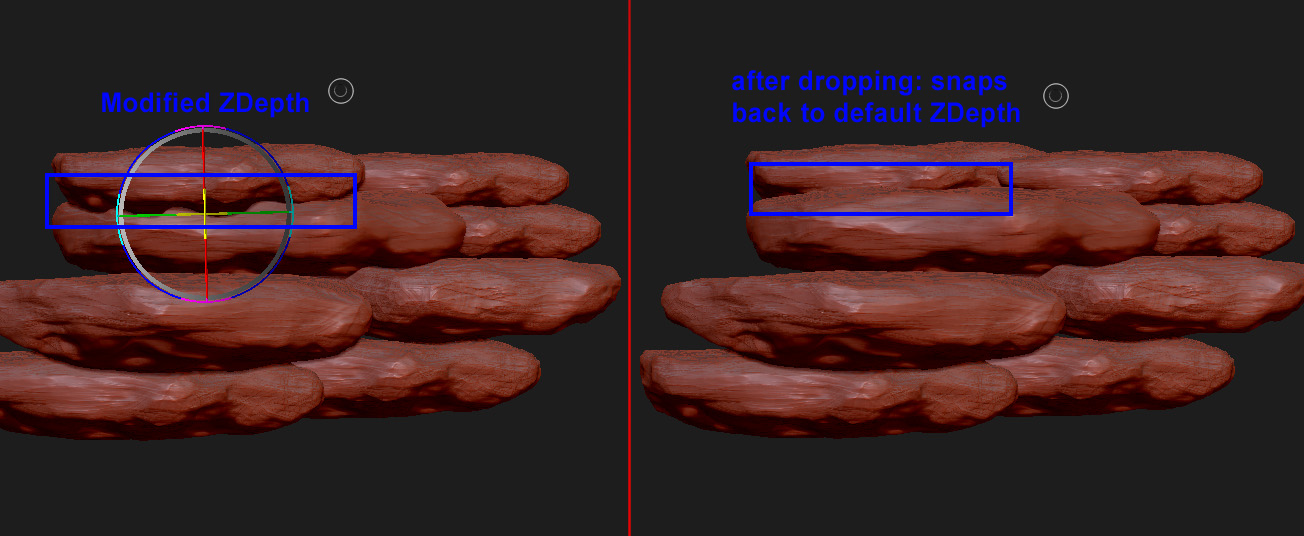
me again with another problem. I’m at the 2.5d canvas again, placing and transforming my tools. I understand that I can change the depth/height of a tool as long as it is active by dragging LMB outside of the gyro. So when I do this, everything behaves properly. But when I press double T or select a new tool in the tool palette in order to place the tool eventually, it keeps snapping back to its original default depth setting:
Can I turn this off somewhere? It is annoying as hell…
If you are working in 2.5D, the last subtool you drew on the canvas will always go back to the ZBrush world center when you enable Edit mode because you are putting it back to a 3D editable state. If you are working in 2.5D mode, you don’t have to go into Edit mode to select another subtool to draw on the canvas. Leave Edit off and just select your other subtools or load new Tools as you normally would. If you are done in 2.5D mode and turn Edit on, and you still need to see the last subtool you drew on the canvas, then go to the Deformation subpalette and move the subtool with the Offset slider until it is where you want it.
There are also other ways to do what you are trying to achieve, and if I’m not mistaken, you want tilable maps. See Environments With Tate Mosesian in ZClassroom.
Oh gosh, I was following this Eat3d tutorial http://eat3d.com/free/zbrush_tile where the guy explained you could just hit T twice and then continue dropping tools. I thought the guys knew what they were doing o.O Strangely, in his tutorial it seems to work. But I just tried to directly select the new tool in the tools palette and now it seems to work like a charm. I don’t know why it didn’t before or if I just had the impression it didn’t work. Anyway, thanks for helping and clarifying the logic behind it. Much appreciated!
I’ll also have a look at that ZClassroom tutorial, thanks!
oh and a last question - before I’ll have to start yet another thread…
Do you guys know how to disable the quick menu popping up on rightclicks? I read about the new ZB release eventually having an option to disable it, but I can’t seemed to find it, neither in ZBrush nor anywhere on the web… =)
In case your wondering why, when you disable ‘Enable RightClick Popup’ button and you still get the RightClick Popup when you right click. I think it is still broken so you will also have to enable ‘RightClick Navigation’ to stop it from popping up.