ZBrushCentral

ZCUT Info Request

The word ZCUT only appears two times in the Practical Guide, both on page 70. The first indicates that it exists. The second is not very much help at all as it informs the reader:

“… ZCUT is currently disabled. It is only available for 3D objects and is beyond he scope of this tutorial”

I would like to cut or remove material from a 3d object and I need so help to use this tool, or an other if that is more appropriate. I would like to trim edges and cut holes. ZSUB only pushes the material out of the opposite surface.

Can someone please help me to figure this out?

Thank you,

UA
There’s some good information on the difference between ZSub and ZCut on the ZBrush Wiki:
http://www.zbrush.info/site/index.php/Draw_Palette

But note that this applies to pixols on the canvas: you can’t use Boolean operations for modeling in ZBrush. You can use markers and the multimarkers tool to draw repeatedly a shape formed by Booleans but you can’t convert it to a polymesh. For sculpting a polymesh in Edit mode, simply use ZSub.

I would also like to know how to cut all the way through the object

Meats Meier’s Wirestyle is the best way to create holes in meshes in ZBrush.

It is possible to create meshes with holes using a Unified Skin but that is not always satisfactory. Other than that, although you can push through an object in Edit mode, you can’t make a clean hole that way. You’d need to adjust a low poly version in another modeler.

Then how am I seeing head models on the discusion bds with the eyelids parted and empty and mouths open?

DO not forget that if you hide parts of the mesh, using the ctrl-shift method, that you can DELETE HIDDEN geometry in the tool -> geometry tab.

With that, you can cut slots and holes etc. etc.

Cheers Lemo

PS:Don’t forget that if you release shift after a shift-ctrl mark of geometry that you can toggle between ‘hide inner’ and ‘hide outer’ selection.

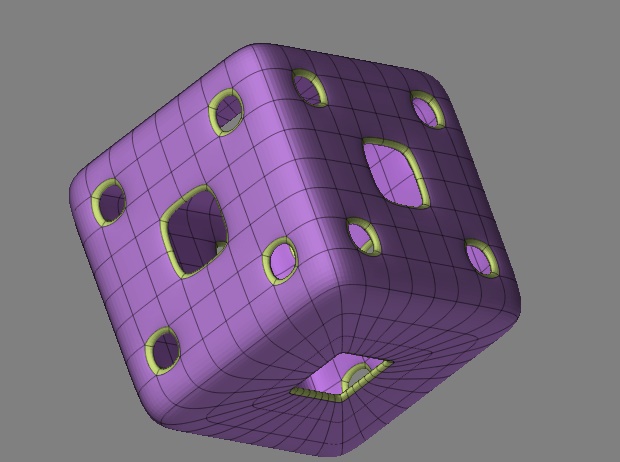
PPS: Swiss cheese sample: A cube with shift-ctrl deletions, morph target -> inflate thickness, and subdivision afterwards. Hope it’s inspiring… at least a little mouse…
purplecheese.jpg

I think perhaps we’re talking about different things. Perhaps I have misunderstood what was original asked but I was talking about boolean type operations where the mesh is kept whole.

Deleting polygons to create a hole is easy enough in ZBrush. At the lowest subd level, hide the polygons you wish to delete, then press Tool>Geometry>Delete Hidden. How clean a hole you get will depend on how clean your geometry is. :slight_smile:

EDIT: Speedy Lemo beat me to it. :slight_smile:

hey that seems like a good idea, but im wonding how/will it give me a thickness to the sides of the hole? what i mean is the polygons going down on the inside of the whole.

Fudge

It is worth remembering that Delete Hidden applies smoothing to the remaining model. To avoid that hide what you want to delete, go to the highest subdivision level and mask everything (Ctrl + A). Now you can go back to subdivision level 1 and press Tool > Geoemtry > Delete Hidden.

Edit: Phudgey, using Tool > Morph Target > Create Difference will create a new tool based on the difference between the currently visible geometry and a stored morph target. That is what Lemonnado did. Delete Hidden is only for removing geometry. I believe the Help file has a zscript tutorial on Create Difference.

As TVeyes says, you can add thickness by using a morph difference mesh but if you mean a boolean like this then that’s not really possible in ZB. This was contructed by deleting part of a plane, storing a morph target, moving forward and then creating a difference mesh. Obviously you can only do this for planes.

Zdiff.jpg

this might be a stupid question but iv got to delete a hole to break my lips apart, how do i hide this area to delete it?

in fact i can hide it using shift cntr but it wont delete it?? when i hit the delete button it says subdividing geometry then the hidden area re appears. how do i resolve this?

Tool>Geometry>Delete Hidden. :slight_smile:

thats what im doing, am i missing something, its such a basic operation whys it not working???

Keep in mind that to use “Delete Hidden” you should work on PolyMesh and on lowest SubDivision Level (or delete lower levels)

  1. draw a new ball
  2. go to EDIT MODE
  3. hit “make polymesh3d” in tool palete
  4. now hold CTRL and draw a mask on the place where you want the hole to be
  5. in TOOL pallete go to MASKING section and hit INVERSE
  6. now go to the bottom of the same section and hit HIDEPT (this will hide now unmasked part of the model in same manner as SHIFT+CTRL+DRAW but with the shape of the mask you draw)
  7. now go to GEOMETRY section and hit DELHIDDEN
  8. enjoy !
  • if you want to add some thicknes to the hole go to the bottom of SUBTOOLS section, adjust settings for THICKNES and press EXTRACT. This will make a new SubTool - copy of original but with thicnes. After that you can uncheck eye icon on the original subtool select it and press DELETE on the same section to get rid of old geometry and leave only the new one with thicknes.