are u guys using the smooth brush? I tried the change curve thing and everything but I hate what it does. Its too hard!!! I am so sad about it!! I use that brush all the time. If u guys are learning how to use the new smooth let me know how…but I wish the 3.0 back…I even prefer zbrush 2 just because of smooth brush…
I already downgraded to 3.0… becasue of this 1 issue
Well, to tell the truth, when I decided days ago to buy ZBrush it was because a new version was out and from 1st september the price will be, ehm, UPdated.
So, I install and… WHAT ? Everything has been changed from demo version 3.0. Oh my ! I’ve spent the next days just reading about this is bad, that is worst, but you know what ? It remains always ZBrush !
I cannot go back of version, but who cares ? Pixologic, for sure, is working on the problem, I think we don’t have to abandon the ship and we have to use the official version for two reasons:
- more users + possible bugs = better next update
- more users + new feature = better knowledge for all
Ok, if you use it for work, I could understand, if it’s just for fun (for me it’s 70% fun and 30% work), well, just have patience, things will get better.
Ok, now, before using the smooth with standard brush, I change values in the smooth brush, taking down the intensity and having high value with Focal Shift, it works for me and I’m satisfied.
Enjoy.
Curiously enough, when i begin working on a model using simple brush and shift to activate smooth, it works fine, but after a while ,for mysterious reasons, the same smooth option ( after pressing shift ) flattens the mesh in a strange manner. HOw does that happen? Any guesses why. Any solutions?
As your working with a piece what happens later on?
you zoom into it to make details
Try scaleing out your model and document zooming in. Getting that ratio correct helps.
The brushes respond to camera space and model scale. along with curves /position of the sun and about 12 other mysterys if the universe.
and H .74 / V.94 curve for your smooth works pretty good with this method.
(little numbers inside the curve window)
Hope that helps.
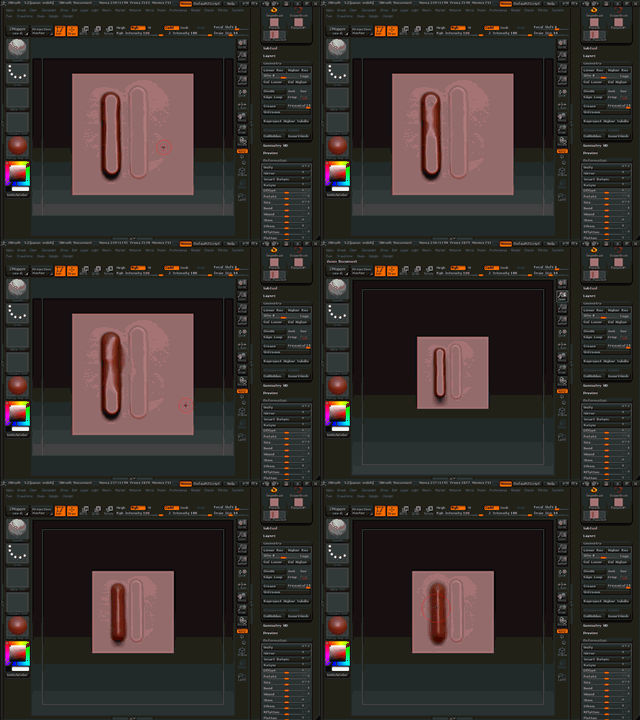
I’m glad I’m not the only one experiencing this problem.
The way the new smooth brush works is terrible. It preforms a flatten effect on the geometry and it’s just unbearable. I am tearing my hair out over this.
Also, where did the other brushes go? (Magnify, Zproject, Nudge, Elastic, Mesh Insert) ??? Smooth is also not in the defaul brush list anymore…
Is there a way to fix the flatten effect. And is there also a way, so that when you hold shift, the intensity of the smooth brush isn’t so harsh???
No doubt it may be called a serious error, this bug of the smooth brush.
Pixologic guys seem to plan just this one on some grounds. Nobody would have objected have the creators had left the old variant and called the newest variant a Flattening-Smooth Brush, sort of. 
This matter is very typical.
Leave good old untouched before deciding to replace it with new.
Same with other things no matter the kind!
:lol: Anatom
on zb3 pre mature release we were saying, in that famous “The great list of Z3 quirks…” that this thread is never gonna end.
i think we shud give them a break.
it looks to me that Pixologic has fired some1. it happens. These guys came from lightwave team and we got zbrush . and now i m expecting another revolutionary software in near future by EX-Pixologic guys. Because this is not the standered of those who created ZB2. i mean come on! u r selling a product like everyone does, dont u have a qa depptt. giving the bbeta testing to “celebrities” just make a lil department that can tell u in plane words that u r gonna make a BIG mess. there are New Bugs New issues and New problems in zb3.1.
my conclusion is that this is not the same team .some how they have lost the real players and less compitent people have taken over.
i m expecting a harsh reply from some1 but i sadi what i said because i luv zbrush.
Stop mucking up the thread. We need Pixologic to listen, not piss them off. This needs to be fixed ASAP.
I found something that helps alot. It’s not in the list, but if you click the active brush you get the full list of brushes. Select the smooth brush and bring it’s intensity down to say 50. That seems to fix the problem.
I went to the smooth brush, not the shift key but from the pallete, and changed the intensity to 10, pick a round soft alpha and now its working fine. I tought before that the intensity for the add standard brush was the same for the smooth when I clicked shift but its not. U have to go there and change. I felt really stupid…I dont know if this will help u guys but I am using the smooth again just fine…
Hi all,
I’m sorry but i don’t agree with you about the new smooth brush. For me it works perfectly in high def… I know the smooth is too hard in low poly but if you drops the Z intensity (exemple : 8/10 in Z intensity) it works perfectly too. And I specify that is not my first version (3.1). I think that it’s only one question of time and usually. Sorry about that but isn’t the difference it not the characteristic of the man ?
Emmanuel
PS : Like Savagliani said
Did you guys trys turning the alpha on for the smooth brush? use alpha 1 which i think was zbrush`s old default.
Good i am no going crazy.
Everytime i smooth something it would flat the surface.
one more bug  how can something so simple be broken?
all these ‘work-arounds’ are not the solution (I hope). This is so drastically different from the way it worked in 3.0 it can’t just be ignored by pixologic like this. What’s going on here, anyways?! I’ve resorted to mudbox for sculpting because this is so ridiculous. I had no issues with SMOOTH in 3.0.
:td:
I loaded up Zbrush 3.0 on my laptop, and with 3.1 on my computer, I tried to adjust 3.1 to act like 3.0.
First thing first, 3.1 now starts with the Smooth brusht at 100 strength, not 30 like in 3.0. BUT, setting 3.1 to 30 was still too strong, I had to make it 7 to equal the strength of 30 in 3.0. Then I adjusted the curve to be inward like most have said, and from there, it pretty much acted enough like 3.0 that I could live with it. It’s just that the strength is 3 times stronger than what they were in 3.0 at the same setting.
Most things like making things flat with it, not smoothing 3Dsphere polar points and so on, can happen in 3.0 too. It’s just, again, you have to keep in mind any strength setting on smooth in 3.1 is 3 times stronger than what you were use to. Not saying that’s all that changed, but a big part. You have to just get use to making it 7 to 15 for what use to be 30-70 or so on.
But one thing I can’t figure out is when you shift to smooth. Like when when you do it with the move tool and shift smooth it does sharpen instead.
I have the same trouble with the smooth brush. I havent really used 3.0 enough to have a fair judgement of the upgrade but, Im very disappointed so far. even if i have my intensity to 2 or 4 on the smooth brush it totally destroys what details i painted because its too harsh. theres also some things with the projection master thats missing from 2.0 that i really liked also. Right now im learning mudbox because I noticed some other people are not happy with the swtich from 2.0 to 3.0
uggh—smooth tool sucks now. sometimes i’ll have a long session of sculpting, then take a break, and when i come back the smooth tool starts to add sharp details. behaving totally diferent than it did when i was sculpting before. the only way i’ve found to fix it is to save my model (tool) and restart zbrush.
that’s a pain in the neck, cuz i have to go back again and reset all of the brush settings i had before. man, i hope this get fixed with the next update. :td:
yes, its very frustrating. I actually set the intesity to 1.0 which i usually set to like 15 - 20 on v2.0 but yes I think they made a change for the worse in version 3.0/3.1. anyways I spent some time learning mudbox the last couple weeks because I got fed up with this and thats been working out great for me.
If Zbrush doesnt fix these issues, I will most likely stick to mudbox unless Im forced to use zbrush on production. I think zbrush is more powerful at the moment with thier texturing tools and the ability to merge multiple objects, but if they dont fix these major frustrations, Mudbox will become more of the industry standard. Im not speaking for just myself but I know of other artists that feel the same way.
I guess the smooth is still not fixed in Z.
How is mudbox compared to zbrush? I guess there is limited texturing in mudbox. But I mostly use photoshop for that.
What functions will I lose with mudbox? I don´t like zspheres, always bring in my own material.
I guess I can just download demo and try mudbox. But it would be annoying if I bought mud and missed something I did not think of.