Hi,
I have a simple question.
I have customized my UI and removed the lightbox icon from it, now I can’t seem to find it under any of the menus.
How do I do to launch it?
Hi,
I have a simple question.
I have customized my UI and removed the lightbox icon from it, now I can’t seem to find it under any of the menus.
How do I do to launch it?
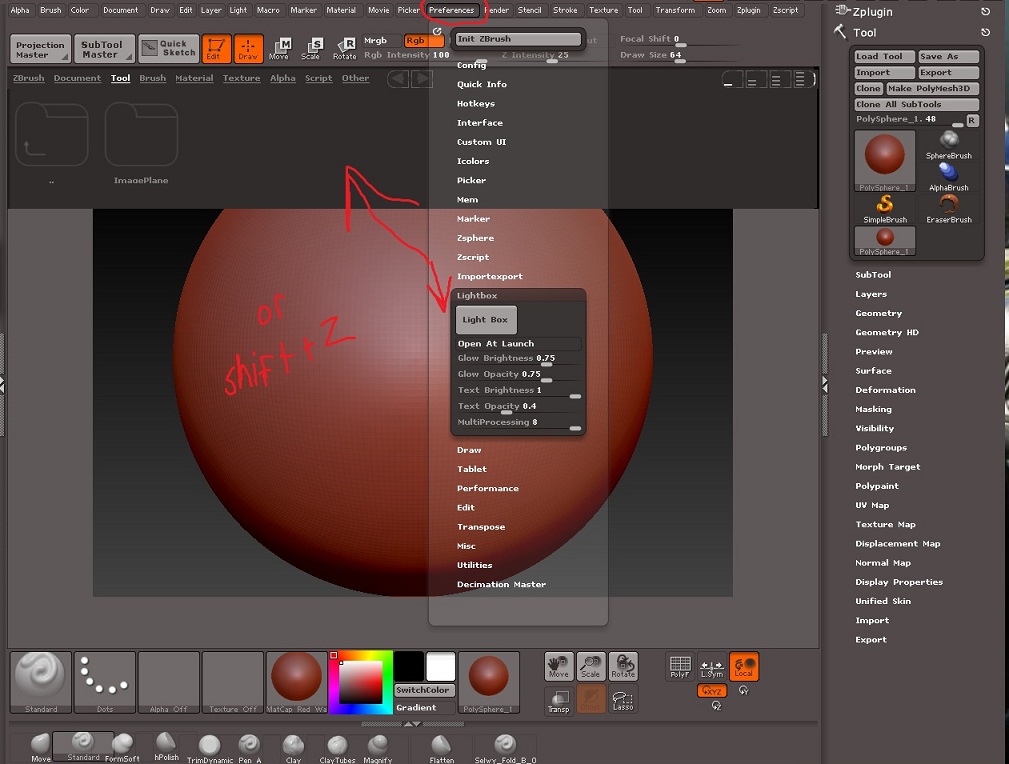
Not sure which version of Zbrush you have but in 3.5 R3 you can just press shift + z to bring it up. Or go to the same place that you went to disable the lightbox on start up, preferences>Lightbox>Light Box button.
Yes, of course, Shift+Z. I did it once by accident but I couldn’t remember the shortcut (I’ve tried pretty much every combination).
Thanks a million times, silkskeeter!
And thank you for the image, the preferences menu is the last place I would have thought of. It was really nice of you :D.
Np I know the feeling of forgeting and/or not knowing where a certain option is in this program. I still dont know where alot of options are  As far as the images goes, its alot easier to find something with an image than it is to read where that certain something is.