ZBrushCentral

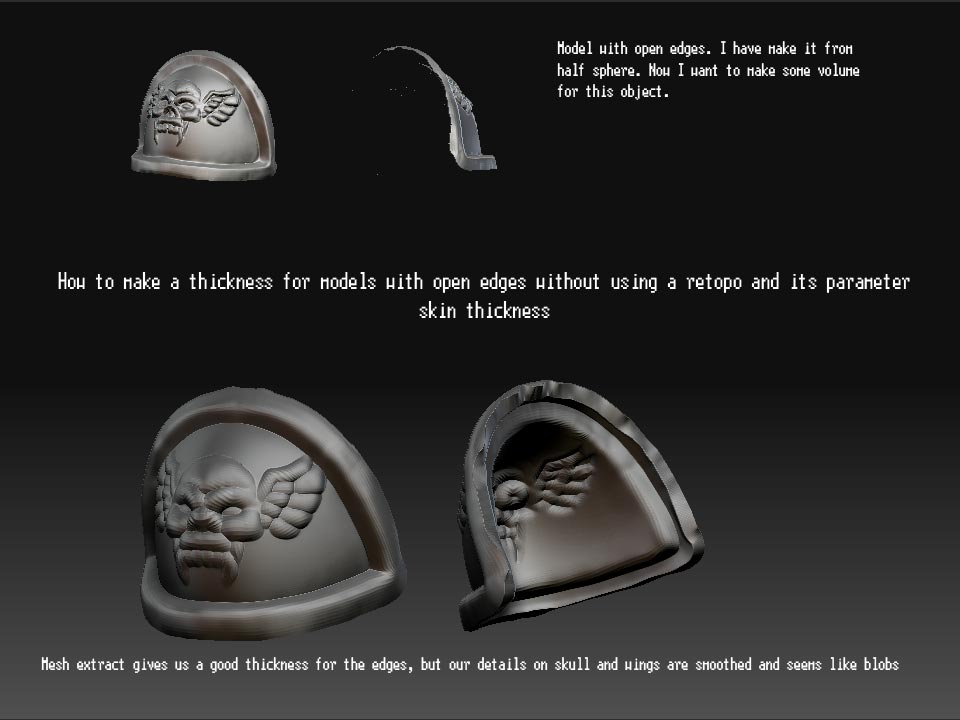
How to add some volume to models with open mesh

Hello to all!
I want to know how to add a thickness to models with open mesh.
Known methods:

  1. using mesh extract (have troubles with details)
  2. using retopo -> skin thickness (have troubles with details or have many many troubles after projection)
    I hope you will help me :cry:
    here is an example pict

Attachments

problem.jpg

Okay guys, i have found the decision of problem:

marcus_civis post:

  1. Store a Morph Target (press Tool>Morph Target>Store MT).
  2. Enlarge your mesh slightly using the Tool>Deformation>Size slider. About 5 should be enough but the amount will depend on how much thickness you want.
  3. Press Tool>Morph Target>Create Diff Mesh. This will create a new tool which will be added to the Tool palette. If you select it you will see it has thickness. You can append this tool to you model as a new subtool.

Thanks for sharing. I had to add thickness to some cloth on a character and this technique works a treat :slight_smile:

I would recommend using Inflate, rather than size - for an even thickness. I got different thickness with size, I noticed. :+1:

Good call. The reason for this is that Size works relative to the model’s origin. Inflate works relative to the surface normals.