ZBrushCentral

Zbrush 5.0 optimized for WINE?

Sorry I’ve been remiss in posting information. I don’t think I’ve experienced the “Save dialog breaks wacom pressure till restarted”. Hmm, or maybe I have. I remember something getting ‘stuck’ and then unsticking it but I can’t remember what the problem was. I’ll try digging into it more.

As for being slow to start, even under windows I found 4r8 to be slower starting though not as slow as wine. I’ve tried digging into looking into working on wine, but its an old-school c code base with some gnarly build requirements. A lot of the slowness to is the client-server arch, which no one really uses.

  • Crusoe

Hello bro, z works fine! the open times its good 1minute. you set wine in 1920 x 1080 and emulate desktop.:+1:

Attachments

But you can’t use goz for houdini I guess?

Import, dynamesh, zremesh, multimapexport plugin (textures and objects), enjoy!
GOZ is the least important here friend.
regards:+1:

Yes if at least zbrush works I can switch to linux! Anyway GoZ is not even working in windows for me with max 2018.

What hardware and wine config are you guys using that it’s working in Wine 2.0+? Decided to start fiddling with this again now that we have Wine 3.0

Are you guys running it through wine directly or playonlinux?

Windows Version?
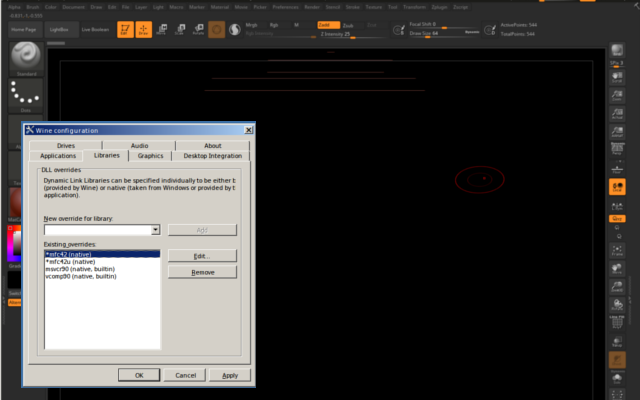
Overriden Libraries?
Emulate Desktop?
WIne Version?
32 or 64bit windows install?

I’m still getting that black viewport issue like in petelang’s screenshot in anything later than wine 2 :confused:

Update:

Fixed the black screen and got it up and running in WIne 3.0-rc6. Running on latest Antergos (Arch), I noticed some missing libs when installing:

ntlm_auth version errors - required installing samba
and two missing module errors - install lib32-mpg123 and lib32-gnutls

While the install ran fine without those, I installed them anyway just to be sure, but the black screen bug was still there. However there was a ton of output about vcomp unsupported something something, So I randomly decided to test overriding vcomp library to (native, builtin), and the black screen is solved!

That’s the only override I’m using, and everything is working well other than that damn tablet pressure bug. Tested working:

  • zremesher
  • dynamesh
  • multi map exporter
  • uv master
  • decimation master
  • spotlight
  • quicksave
  • movies/turntables
  • bpr
  • lightbox! - no longer buggy but i’m not sure that it’s entirely showing everything - there’s nothing under demo projects.

For the tablet pressure, I’ve tried overriding wintab32 to native as well (even though it is NOT recommended for that lib), and it’s the same issue from before/with builtin - queue overflow after opening a file dialog. If somebody can help with a solution for that we will have a fully functional zbrush under wine!

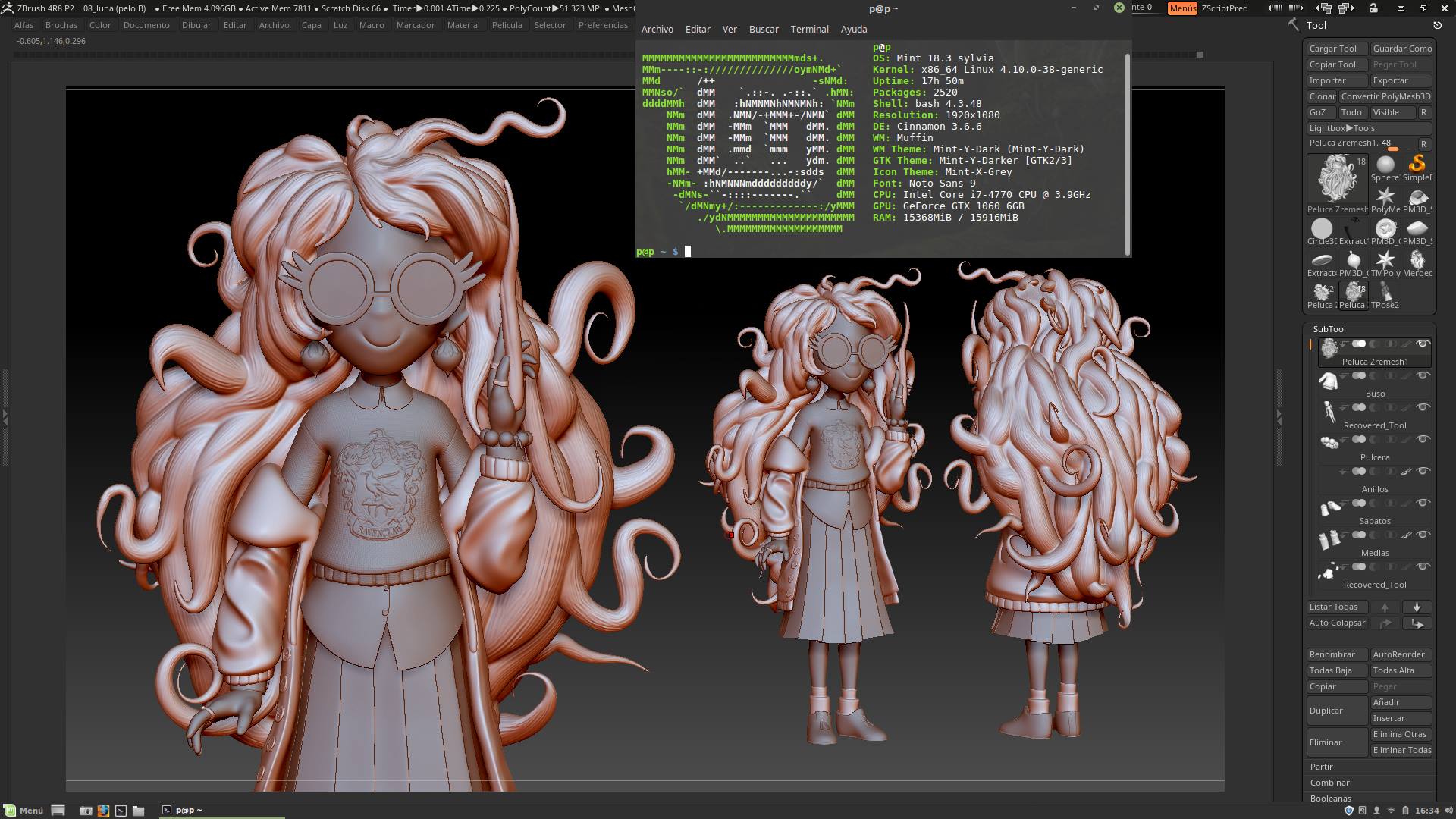
I was looking to find ZBrush 4r8 for Linux as well. Many 3D apps today have a Linux version. When I look at the ZBrush store I was surprised that is not supported :cry:.

pressure is working on my end. im using HUION 1060plus.
im using the digimend package, with my device using “wacom” as driver.

also overriding comp90.dll for that blacklines error.

ZBrush 2018 with Wine 3.5 seems to have cured the startup slowness for me. Starts up right away.

Still can’t get Wacom pressure working properly. Even before it fails from opening/saving, the pressure seems to stutter sometimes. Also getting some nasty screen tearing with 2018, which I couldn’t figure out.

I go screen tearing at my win 10 - while resizing window and not often with dropped mesh onto canvas, while 2nd is in edit mode.

I think it’s Ryzen processor. This thing won’t appear on my 2nd pc with win 7 and I7 cpu.

Some other comments about wine? Do you use if daily? I would love to try this out but got too much commission work and can’t play with linux right now and got my two licences active…

I won’t use it daily on linux until the wacom works properly.

I have a hackintosh that I use as a secondary machine for zbrush and adobe suite. ZBrush screen tears there too, but both Mac and Linux are much more responsive than the terrible input lag with windows.

THat wacom thing made upset :wink: Well, I will try it on my own anyway. Found guy on youtube that runs ZB 2018 at Mint and Play on Linux.
Gotta try it too.

So i have got Zbrush 2018 to at least run on Linux Mint 18.3 with Wine 3.6, but I can’t get rid of the black canvas with lines through it. I have heard people say stuff about vcomp and comp90 override but not sure if i am doing it right. And does the windows 7 or 10 matter in this instance? I am new to Linux and I don’t want to have to go back to windows just for Zbrush. Can someone help provide a new linux friendly step by step to get rid of the black canvas with lines. Thanks for any help.

Drazzar

No worries Drazzer! Let me see if I can help you out. :slight_smile:

If you’re not using Playonlinux (or alternative) I would recommend that instead of just installing straight to a default Wine prefix. It’s some advanced and fumbly territory if you’re not very experienced yet and Playonlinux does a great job of keeping things simple.

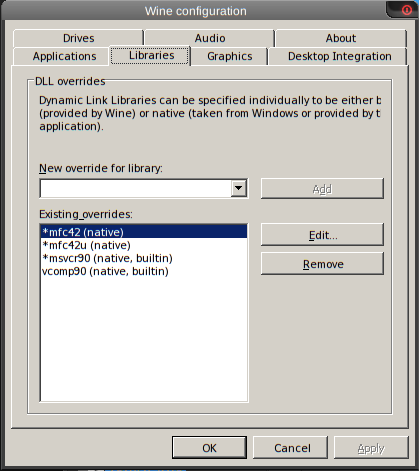
I’ve got my installation for Zbrush 2018 set using Wine 3.5 64-bit (but I wouldn’t imagine 3.6 to be a problem). In the Wine Config, it’s set to Windows 7, which hasn’t given me any troubles. I’ll post a screen of my config below:

WineConfig.png

A page that has helped me with this can be found here

Hopefully these hints get you going without those nasty black lines!

Well, I tried using PlayonLinux using Wine 3.5 with windows 7 but it still comes up exactly the same. I just installed Linux so is there anything else I need to install for this to work. Here is a screenshot.
zbrush_error.png
as you can see when i try to add anything to the canvas I can only see lines of it. Also one of my files, msvcr90, didn’t have an asterisk next to it like in the other screenshot. Thanks for any advice.

Update: Nevermind, I actually got it to work finally. I tried reinstalling all the components to make sure I didn’t miss one and it worked. I don’t remember installing vcrun2008 the first time. But thanks for all the help. Hope they come out with an official Linux version still. In the meantime happy Zbrushing everyone.

Awesome that you found that. Before seeing the note, I was wondering if some component had been overlooked somewhere.

Take care!

Zbrush hidpi support is still lacking, they have some TEENY icons here and there and they really need to fix it. I will just make a dedicated zbrush user, and have my laptop start in a lower res when that user logs on, and move my zbrush install to that user.

That said, using wine 3.17, startup performance is better and you need to tweak and install fewer things.

Installed wine 3.17

Installed winetricks

winetricks vcrun2010 vcrun2008 corefonts win10

Then I used wine to run the installer. And then use wine to run zbrush. It all seems to run great so far, though there might be another lib or so needed for zremesher. The basics work though.

Fast boot, fast sculpting, fast speed. WEEE!

Also, you can disable ‘emulate a desktop’ in wine, as zbrush startup is now just fine on wine.

Tried wine under CentOS7 but some quick tests failed.

However, qemu with -kvm will run Windows Server 2012 or another version of Windows. A wacom tablet can be passed through also (used a somewhat older version that installs without the device). Got it fully functional running 15M polys without lag.

A secondary mouse can be useful when the tablet is passed through when needing to quickly do something in the host.

+1 for Linux version. For my needs it works better as an OS (tablet just works, no issues with forced updates).

In a meantime I’ve managed to get the demo running - I’m testing the waters before I’ll try to mess with a PC in my workshop.
Has anyone noticed a bit of tearing (or something closer to frame being one step behind) on Nvidia card? Not sure the problem shows on Radeons / Intel as well (don’t have Radeon card at home to test). It’s minot but noticeable on my end (and I’m a bit picky on this matter as I’ve experienced similar thing in MoI which prevented for me its use on Linux - but it’s worse there).

Initially the maximize / minimize button in the UI didn’t maximize to full screen , but after tweaking window decoration settings it started to work.

Other than that - performance in initial test is super. Everything extremely smooth and enjoyable , Dynamesh / Zremesher / Sculptris Pro work out of the box.