Same thing like nimlot !!!
Awwww man I love this now. When I first tried this out, in early days, I liked the concept, but didn’t see it as part of my workflow.
now though! I love the updates!! This is so cool as a conceptual and sculpting tool!
And GoZ!!! yeah!!! this is cool!
Now I just need GoZ for Blender ( HINT HINT!!! ) and my life is going to be so much easier!
Can’t wait to see more from this little puppy! It really is awesome and going to speed up my workflow… not to mention… it’s fun!
GRIN!
I cant seem to get GoZ to work in either direction, Ihave instaled the latest version in Zbrush but cant seem to figure it out.
Sculptris tells me I need to “instal GoZ and configure Zbrush first”
And Zbrush just dosent seem to see Sculptris and its the only other thing I have that uses GoZ…
Any sugestions?
Cheers!
Mealea
@MealeaYing
From goz installation txt
"
- Copy this Sculptris folder into Users/Shared/Pixologic/GoZApps/
( it means the goz folder inside sculptris folder) - Run ZBrush and configure the GoZ path to Sculptris.app, based on where you’ve unpacked it"
[attach=257891]Screen shot.jpg[/attach]
Attachments
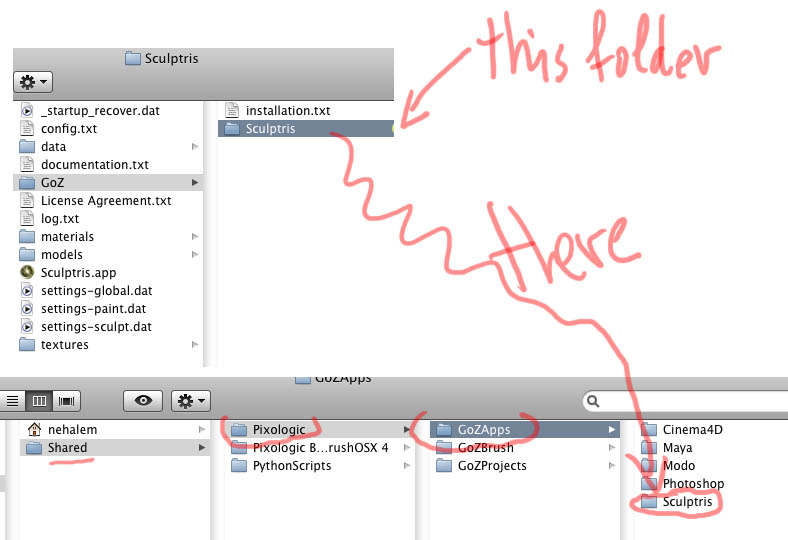
I figured it out!!!
ITS AWESOME!!!
Its better than cheesecake… wait… almost… welll… Cheese cake is good too.
Its like cheesecake with polygons!
This is fantastic, I love you guys, thank you again and again
In Zbrush, go to preferences menu, down to GoZ, select Path to Sculptris. ZBrush will do a search for installed versions of Sculptris, select Alpha 6, job done. Should work after that.
[edit] lol ok, you got there already 
@MealeaYing
It will look like cheese cake after some subdivisions though.
:lol: :lol: :lol:
remember my advise (quasi auto retopo)
Really excited about this!
Thank you,
MAH
Thanks! I saw this after I posted my last thingy, GRIN!!!
I cant believe how well this works!!!
In the GoZ upgrade instructions PDF file, in the windows section it says to rename or replace:
C:\Users\Public
This is dangerously incorrect, it should say:
C:\Users\Public\Pixologic
Messing with the other one could screw up a LOT of other software.
Just thought I ought to point this out.
Cheers!
Mealea
When I download the latest GoZ and perform the install, I do not see an application folder for Sculptris in the “GoZapps” folder.
The date on the GoZ zip I get from the download center is “GoZ_Win_May-13-2011”
Am I missing a newer version of GoZ that includes the Sculptris functionality?
Sorry to keep sounding idiotic . But whats the advantage of “goz’ing” between sculptris and zbrush. Zbrush doesn’t like triangles, or rather displays them like it doesn’t like them:D. I know there was a brief answer to update the mesh, but I’m not sure what that means? Update = retopologize?
Muddpitt,
I think the defining feature of Sculptris is “Dynamic Tesselation”.
Before if you were sculpting in zbrush you could push a mesh so hard that it would break and you would see artifacts.
When you sculpt in sculptris it actually adds geometry as you sculpt.
As far as the triangles question perhaps others could explain.
@Prosthesis i installed that May 13th goZ version. hit the goZ button in zbrush to configure and it worked. so just go through the motions and see if it works for you too.
@ Muddpitt:
What dosent it like about triangles?
My mesh looks “old” when goz’d back to zbrush and its not easy to work on.
Congratulations on the first real big step!
I am so happy to see some Mac users work in the future.
I am sure it will be fun for many, many people.
And more talents will make the step into 3D sculpting because of sculptris very intuitive interface.
Tris and Quads.
There are some month left to talk about this.
Finally it will be solved.
Pixologic will take their time to show something outstanding.
I can understand that some of the zBrush users are asking for the use.
If they are very good in zBrush they don’t really need sculptris.
But give it a try and you will love it.
And those who are uncertain of sculptris use, will soon start to doodle around during meetings and telephone calls. Creating 3d sketches on the fly.
Thanks to Pixologic for developing this nice software instead of eating it.
@Muddpitt, MealeaYing
A simple solution for the moment, the quasi autoretopo
http://www.zbrushcentral.com/showthread.php?t=143454
At least it eliminates this cottage cheese issue.
I woke up in the morning and felt compelled to check ZbC before I head out. The whole day all I did was think about using this. My dreams are coming true. Can’t wait to do some stuff.
Thanks for this! Dr Petter!
The whole interface seems to be darker than the last version.
I guess its going the zbrush way.I figured out how to change the background. But the brush buttons are a bit dark for my liking.I found the data folder with all the icon pngs.Am I correct in thinking that if I change the colour of the png in photoshop and swap them out, as long as they have the same name will that be ok. I dont want to break anything! Anyone know which one the button background is.