Great work Sven.  Very useful plugin and helpful documentation - I’m a not-so-new user who learnt something.
great!
quite useful plugin 
Thanks sven this looks very useful - gonna give this a whirl later on
Chris
Sweet! Sven yøu the man once again.
Been trying to do this for some time! thank you!
i have Texture>cropAndFill but no Texture>FillObject
i have color>FillObject but the texture must be turned off.
Pixol-dust,
Pixol-dust said: i have color>FillObject but the texture must be turned off.
You’re right, it should be Color>FillObject… sorry. (I fixed it in the post and .doc file.)
And yes, the texture must be off to use the Color>FillObject Button since you would not see the effect (either of the color change or the material change in the object) because the applied texture’s color and material would override the change to the object.
Sven
Sven I have understood this concept a bit but I am not able to understand whats the use of it.
See most of us use texture, this plugin wont help in that as masking wont be of any use.
Point is why should we want to bother about changing the material index embedded on the model( untill we paint directly on the model) ?
Normally when we select any material, zbrush shows us the selected material irrespective of matertial 00 still imbedded in it.
When we export the texture we still have the material which we ahve assigned to it rather 00 one.
Currently i cannot think of much use of this plugin, maybe with Z 2.5, when most of us will be painting on the model itself, then it might help.
Do let me know, if I am thinking in the wrong direction.
Sunny
Thinking again
Do you mean to say it will help in capturing the base material of the model ?
Say I use mostly toon shaded material for my comic charcters., if i embedd the toon shaded material directly on the texture, before painting other details on it, the texture will store the toonshaded material.
That means I will not have to load the toon material again next time when I load the character?
If so, I think this is a very appropriate use of your plugin. 
let me know.
Hi Sunny,
No, Embed-Mat WON’T let you permanently embed any “customized” material in your texture map. What it does is embed the index material of your choice to the entire texture map BEFORE you begin painting other index materials onto sub-sections of your texture map.
Why do you need to do this? Because if you leave areas of your texture map embedded with material index 00, those areas will still display as whatever material index number you’ve currently selected.
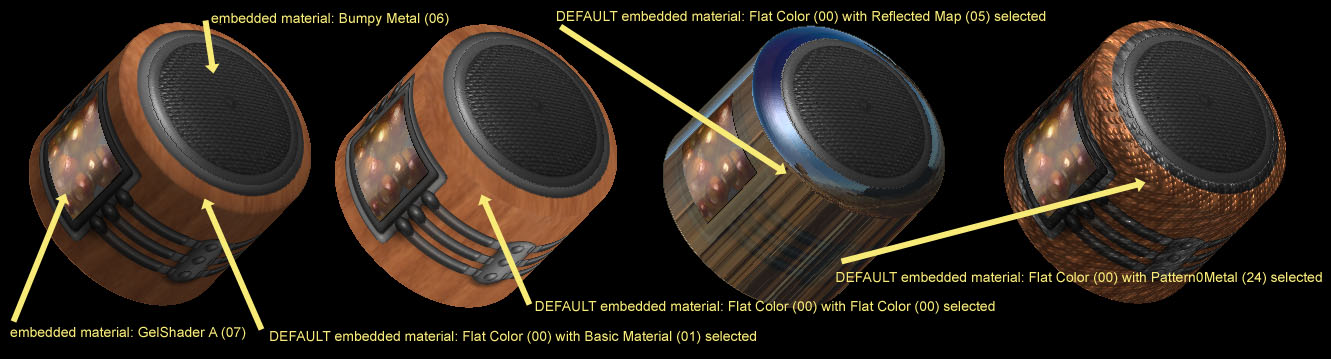
To understand this, run the Projection Master Tutorial - Part 3 called Shading and Material Effects. Note that during the tutorial, a wood grain is applied to the cylinder, then some metal bands are applied and a window filled with some spheres. Finally, a kind of speaker texture is laid on each end. Finally, the tutorial uses projection master to embed the little window with Gel Shader A and the speaker area with Bumpy Metal.
After the tutorial is finished, everything seems ok with the cylinder’s texture… but it’s not. The woodgrain area of the texture map is still embedded with the default material, Flat Color (00). It LOOKS ok, because the currently selected material is Basic Material (01).
To see what I mean, exit the Projection Master Tutorial. Now select another material, for instance Reflected Map (05). Notice that the wood grain areas take on the chrome material appearance? Now select another material, for instance Pattern0Metal (24) Notice the wood grain areas take on a kind of bumpy metal appearance?
So What? Well, the simple purpose of the EmbedMat Button is to initialize the entire texture map with some other material… REPLACING THE DEFAULT MATERIAL (00). If the Projection Master Tutorial had used the EmbedMat Button first, the wood grain areas would have maintained whatever material had been assigned.
To see what I mean about the default material see the attached image.
Sven
Attachments
Got it seven. 
But can a plugin be made for solving the live material slot problem on canvas for illustrations ?
I can understand as Aurick says the live material is very important, but sometimes it just screws all my illustration any remedy for that ?
Sunny,
Take a look at: Matslots plugin.
The whole issue of ‘live materials’ is problematic for some people but once you’ve got to grips with the principle of material ‘slots’ it ceases to be an issue. This plugin helps clarify the subject.
Sunny,
Marcus is right, the Matslots plugin is very handy for keeping track of materials you’ve used in a scene. When you want to add a new custom material, be sure to first choose a different, unused material slot, THEN load the new custom material. That way, you leave those materials already in the scene as they were.
BAKING THE LAYER
Another thing you should experiment with is the Layer>Bake Button which lets you capture the rendered appearance of color and, materials, shading AND shadows at the time you press the Bake Button.
As the pop-up for the Bake Button states: "… converts all rendered material and shading effects on this layer to flat-color pixol images.
… effectively ZBrush takes a ‘snapshot’ of the layer and repaints it entirely using the flat color material."
While this will capture the rendered look of the original materials and shadows, be aware that you trade-off the possibility of adding more light/shade effects for the baked parts of the scene in future renders because they are now assigned the flat-color material (i.e. no shadows allowed).
Sven
Thanks Marcus, Sven
I have matslot plugin installed but I dont use it, because first it is not easy to remember each custom material name( not default ones) and I use mostly material pack 2, hence the problem is I have to load each material
in any case, I just keep in mind I dont replace the current material which is being used on the canvas.
It will be much better if Marcus include a thumbnail of the material as well in the next update. Ya it will make it look like material pack 2 but visually it will be easier to use.
Bake BTN - Sven without it I dont think I can even dream of completing my comic issues on time. Probably I use it more then any body else using zbrush, my every object is placed in a different layer and every layer is baked before creating a new layer.
The only error I face is I forget to use best render button sometimes (Before baking) leading to graphics without shadows, still learning to cope with it.
Thanks Sven…another great idea!
how’s the new machine?
definetely this plugin rocks,easy way texturing with materials.
thanks a lot.
Hi Nuts,
Have not seen your name for a while.
For the longest time I couldn’t get the rules straight as to how ZBrush assigned materials (especially the wildcard nature of mat 00, and the fact that the model and the texture could be assigned different materials.) To straighten that all out in my head I wrote the Embed-Mat script. I think there’s still more that a script could manage where materials are concerned (wink) but I’m saving it until after the 2.5 stork comes.
The new system isn’t anything great, just more memory and more speed - good for ZBrushing and good for Mirage projects, too.
be well, Sven
Thank you so much. I finally fully understand. Most appreciated.
i try to understand it’s not easy!(;-
if i think good this plug create texture base on material !
kiki,
Please DON’T use this outdated version of Embed-Mat.
This plugin was meant for use in ZBrush 2.0 and won’t work properly with 3.0 (a new version of Embed-Mat is completed and being tested… I hope to post it very soon.)
ALSO, Embed-Mat WAS NOT MEANT TO CREATE A TEXTURE MAP BASED ON THE MATERIAL. It just made it possible to assign a material PERMANENTLY to the texture map without changing the texture map’s image.
Sven