Ah, I finally just got it to happen too. But Im not sure how. Let me keep at it here. Your program is functioning as it should, but something about your process is triggering a bug.
As near as I can tell, it has no specific trigger, it’s just a result of system limitation or configuration. There is simply a limit to how many negative meshes I can pile on a dynamesh in a single operation, before the error you are experiencing happens. However, I seem to be able to pile quite a few more negative spheres onto my dynameshs before I get that error, than you are there. I don’t know what the differences in our systems might be.
Increasing dynameshmesh resolution doesn’t help, so it must be some sort of system or configuration limitation. What youre doing there doesn’t look like it should be taxing Dynamesh’s detail limits.
There are work arounds though.
-
Simply create your shape incrementally with fewer negative meshes in a series of remeshes.
-
For certain exercises, the previous versions re-meshing options in the subtool menu might yield better results.
its an odd one isnt it. my system should be able to handle this without any trouble
Ive got 2 quad core processors and 12 gb of DDR3 ram … a ATI Radeon HD4670 graphics card… its a 64bit system.
I couldn’t possibly say. It might be configuration. There might be other factors like the amount of surface area involved that differ in our tests. It might just be a different program version on different OS. But we both seem to suffer from the same basic problem.
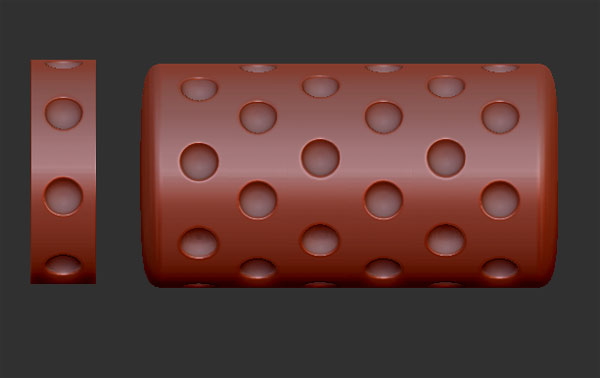
Just keep in mind, Zbrush is about lateral thinking. So if you run into trouble from trying to do a thing one, way, try to approach it from another angle. For instance, I made the same shape you were trying to make by making only a single ring of negative spheres, and duplicating it again and again, and remeshing into a whole:
Im having the same issues, but not aways. I guess its a problem with the shortcuts or something. It works, but sometimes it does not  Maybe its just me, but we’ll see…
What OS? Here, under OSX 10.6.8
It seems unpredictable.
I started inserting negative tool, duplicated a few times (ctrl+move) then ctrl drag twice and had the same weird result.
Undo then, did the same but less spheres and worked fine. Tried a lot more spheres and still works fine. It’s weird and probably a bug.
How many of you are using the InsertMesh Dot brush, and how many are using one of the new insert brushes? The reason I ask is because InsertMesh Dot is doing something very similar to what is being described here. If I try to subtract an custom InsertMesh Dot brush, the brush will be subtracted from instead of the polymesh I drew the brush onto. Add works normally, while And acts like Add. If I use an InsertSphere Brush instead, all three functions works exactly like they’re supposed to. Thankfully all of the new insert brushes can be modified with a custom polymesh, so InsertMesh Dot isn’t really needed when doing booleans.
PS: By the way, the three buttons do work (Add, Sub, And). You just have to clear the mask first before pressing one of them.
Edit: Well, the buttons were working for me (and nice if you forget to hold alt), but after restarting ZBrush they no longer work. Definitely buggy…
Edit: Now the Add button is subtracting, lol. These buttons must be involved somehow with whatever the problem is. :lol:
My guess on this issue (that everybody will experiment sooner or later) is that it happens when the polyvcount of the subtracting meshes becomes higher to the one of the base one. for some strange reason you cannot subtract a mesh that has more polygons then the base one (or at least, this is what came out from my many tests). this is a somewhat minor problem, cause eventually the most of times you will use simple geometries to insert holes, but just in case you want to create more complex subtractive forms keep it in mind 