Try this and see if it fixes your crashes.
I had some problem with my 6800 but I did the following
- installed latest drivers
- Zbrush uses virtual memory from the c: without crashing if you have ever tweaked where your virtual memory goes to you will get alot of crashing.
Control panel /system /advanced and performance Now it runs really good.
Except the crash buttons.

hi cameyo, same problem ! Win XP Pro ver2, E6600, 2 gig mem,2x 250 in raid 0 and a nvidia 7900 GS with 250 meg. Here we go again:(
Thank you feureau ,it works fine now , little bugger ain`t it 
Yeah, quite a nasty little bugger.
Btw, has anyone tried the fix yet? I wanna know if it is really the culprit. It seems to fix zb for some people but I wonder if it’s one of them catch 22 thing.
This might sound weird, but i also get a crash on my 2GBRam 4800+Duo Core, 7900GTX computer… Probaly is the graphics card?.. Where can i get the latest drivers for my 7900GTX? Its hard for me to get the drivers from the Nvidia website, they keep saying to get it from there, but it never says 7900GTX T_T, Help? THanks!
Hopefully this will fix the crash after subdiviving to level 6 or more… Even When i try to open Zbrush it crashes at starting.
Hi Feureau,
i have tried your workaround, but don’t works for me…the crash is here…
Only disabling the Hardware acceleration of graphics card remove the problem.
Thanks.
cameyo
That is strange. I thought Z3 don’t use hardware acceleration at all. Everything is handled by the software. aurick, can you verify this?
Anyway, the workaround was for Z3 that keeps on crashing. My z3 still crashes when best rendering colorizeGlow. But it works fine with cursor rendering. (Ctrl+R) So, that might help. (put your colorize Glow tool/stuff in a separate layer?)
Hi camyo,
Confirmed: Best render of Glow and ColorizeGlow materials crashes ZB3.
Tested PullDownMenuOpacity = 100 and Notes Fade In-Out Time = 0: still crashes.
Windows event log information:
Event Type: Error
Event Source: Application Error
Event Category: None
Event ID: 1000
Date: 24/05/2007
Time: 07:07:06
User: N/A
Computer: PHAEDRUS10
Description:
Faulting application zbrush3.exe, version 3.0.0.0, faulting module ntdll.dll, version 5.1.2600.2180, fault address 0x0002ae22.
For more information, see Help and Support Center at http://go.microsoft.com/fwlink/events.asp.
Data:
0000: 41 70 70 6c 69 63 61 74 Applicat
0008: 69 6f 6e 20 46 61 69 6c ion Fail
0010: 75 72 65 20 20 7a 62 72 ure zbr
0018: 75 73 68 33 2e 65 78 65 ush3.exe
0020: 20 33 2e 30 2e 30 2e 30 3.0.0.0
0028: 20 69 6e 20 6e 74 64 6c in ntdl
0030: 6c 2e 64 6c 6c 20 35 2e l.dll 5.
0038: 31 2e 32 36 30 30 2e 32 1.2600.2
0040: 31 38 30 20 61 74 20 6f 180 at o
0048: 66 66 73 65 74 20 30 30 ffset 00
0050: 30 32 61 65 32 32 0d 0a 02ae22…
System Specs:
Win XP Pro SP2
Core 2 Duo E6600
2 GB RAM
C: = 320GB SATA
D: = 2x500 SATA in RAID 1
nVidia GeForce 7900 GS with 256 MB of RAM and ForceWare 93.71
ASUS P5B Deluxe (WiFi-AP Edition)
feureau, seemed to fix it for a while , however after restarting later in the eve, it caused a…crash again even with ya fix…opps:td:
It is not the video card, ZBrush will work with any video card you have.
The problem is actually is with multithreaded rendering of the ColorizeGlow material. This will be fixed in the next update, for now, if you use this material, turn off the MultiRender option in the PREFERENCES:Performance subpalette.
Note: The thread title changed to reflect this problem.
Tried the changes. No luck, still crashes. Also crashes often if I’m trying different materials and doing best renders. I can get away with a couple of renders and then it just crashes. If I save every couple of renders and restart ZBrush I can avoid the crashes but it is a nuisance.
Thank you Aurick 
Is it possible if you could still tell me, where i can get the update for the graphics card?. 7900GTx?
Thanks Aurick…
but it don’t work…still crash…
More, the MultiRender Option cannot be saved with Ctrl-Shift-I (Preferences->Config->Store Config)
This workaround do not solve the problem.
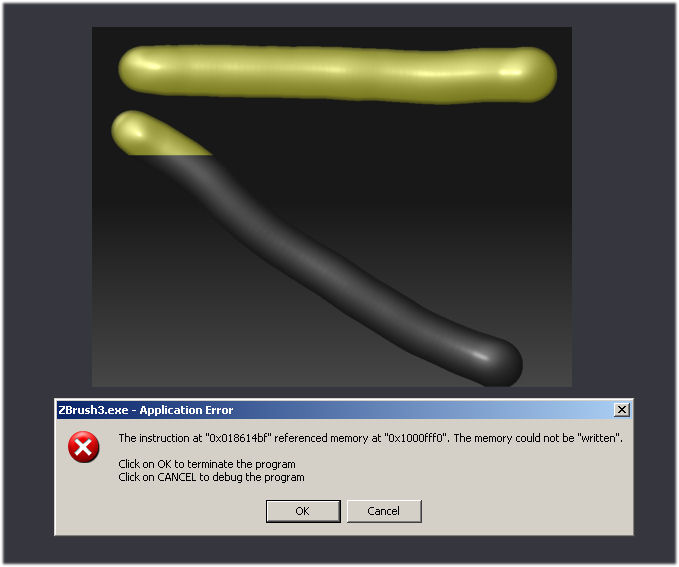
More info on this error:
If i draw something with the ColorizedGlow Material in the upper side of canvas (see fig.1) the render is OK (no crash).
[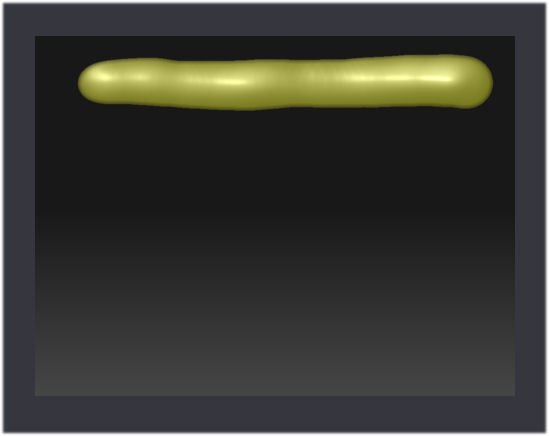 ]
]
I hope this helps Pixologic programmers …
cameyo
went to nvidia.com to get the driver update but as aurick was saying its a program issue. Still you should always keep your video driver up to date;)
CannedMushrooms: my driver are update.
I hope the next update will be free…i.e. i wish Z3 working well, not Z4 with bugs.
Thanks.
cameyo
p.s. ZBrush is the best graphics program to unleash creativity
I hope the next update will be free toooooo, as so many programs catch there userbase out ( poor little ginipigs ). And that seems to be the norm, hope it`s not going to be the case after waiting for sooooo long ?
The next release is a bug fix / feature tweak. So yes, it is free to Z3 owners.
I just discovered that I can render without any crashes in a larger document size. I have tried many renders at 3840X2880 with both glow materials and there are no crashes…
Hope this helps…